
December 17, 2025
Cloud to On-Premises Migration: Costs, Performance & Strategic Benefits

Shyam Kapdi
Author

Nandini Parekh
Contributor

Shailesh Davara
Reviewer
Introduction
“Cloud first” was the default answer to almost every IT question. Yet in the last few years, a quiet counter-movement has gained momentum: organizations are intentionally moving workloads back from public cloud to on-premises or private infrastructure.
This isn’t a rejection of the cloud, but it’s a recognition that not every workload belongs there forever.
Moving some or all workloads, data, or apps from a public cloud environment back to a private cloud or on-premises data centre is known as cloud repatriation. It’s a strategic adjustment rather than an admission of failure. Organisations are coming to the awareness that while the cloud is perfect in many situations, it is not a universal solution. A more complex approach is being prompted by factors such as unpredictable costs, performance bottlenecks, and strict compliance requirements.
Cloud vs. On-Premises: A Detailed Comparison
| Aspect | Public Cloud | On-Premises / Private Cloud |
|---|---|---|
| Cost Structure | Operational Expenditure (OpEx). Pay-as-you-go pricing with variable and sometimes complex billing. Best suited for unpredictable, spiky workloads or use cases requiring rapid, large-scale elasticity. | Capital Expenditure (CapEx). Significant upfront investment with predictable ongoing costs (power, cooling, maintenance). Efficient for stable, predictable workloads. |
| Performance & Latency | Shared resources (“noisy neighbors”) can cause variability. Performance is internet-dependent, adding latency. | Dedicated hardware ensures consistent, predictable performance. Ultra-low latency for locally accessed data and applications. |
| Security & Control | Shared Responsibility Model. The provider secures the infrastructure; you secure your data & access. | Full Control. You manage the entire security stack, from physical access to network perimeters. Essential for certain compliance regimes. |
| Scalability & Flexibility | Instant, limitless elasticity. Rapid global deployment. Perfect for growth, testing, and seasonal spikes. | Planned capacity. Scaling requires purchasing, installing, and configuring new hardware. Slower, but it offers complete control over specifications. |
| Maintenance & Operations | Provider handles hardware maintenance and underlying infrastructure updates, reducing - but not eliminating - operational responsibilities for platform, security, and cost governance. | Your internal team manages everything: hardware failures, updates, and maintenance windows. Requires specialized staff. |
| Disaster Recovery | Built-in geographic redundancy and rapid recovery services (snapshots, failover). It can be cost-effective for DR. | Repatriated workloads can still use the public cloud as a low-cost, on-demand Disaster Recovery site, providing the best of both worlds. |
When Cloud Repatriation Creates Measurable Business Value?
Cost Considerations
- Unpredictable cloud billing can significantly impact budgets - especially when data egress and sustained compute needs grow.
- If workloads show long-term stability, fixed investments in on-premises infrastructure can lower total costs over time.
Performance & Latency Requirements
- High-performance computing, real-time processing, or legacy apps requiring low latency often justify repatriation.
- Cloud limitations under these conditions can degrade user experience or operational effectiveness.
Security & Compliance Drivers
- Data sovereignty laws and strict industry regulations (finance, healthcare, government) mandate keeping sensitive data on-premises.
- Protecting intellectual property with full physical control pushes organizations back to internal infrastructure.
Architectural & Operational Factors
- Predictable, steady-state workloads with existing datacenter investments favor repatriation.
- Hybrid cloud models serve as a strategic middle ground, balancing cloud’s scalability and on-premises control.
Pre-Migration Assessment Framework
Workload Evaluation Checklist
- Dependency Mapping: Identify every application, service, and dataset that interacts with the target workload. What breaks if you move it?
- Performance Baseline: Document current cloud performance metrics (CPU, memory, I/O, latency) to set targets for the on-premises environment.
- Security & Compliance Review: Catalog all security policies, compliance certifications, and data handling requirements that must be replicated.
Cost-Benefit Analysis Methodology
- Build a 3-5 Year TCO (Total Cost of Ownership) Model: Compare all-in cloud costs (compute, storage, egress, support) against on-premises costs (hardware, software licenses, power, cooling, facility, admin labor).
- Uncover Hidden Costs: Don’t forget cloud training, premium support, and the internal labor cost of managing complex cloud bills. On-premises has hidden costs in procurement time, maintenance labor, and refresh cycles.
- Project ROI Timeline: Determine when the upfront CapEx will be offset by the reduced OpEx. If the payback period is too long, repatriation may not be justified.
Technical Readiness Assessment
- Infrastructure Compatibility: Does your existing data center have the power, cooling, space, and network backbone for the new hardware?
- Skills Gap Analysis: Do your sysadmins have the skills to manage this infrastructure, or is retraining/recruiting needed?
- Tooling Evaluation: Your cloud monitoring, backup, and CI/CD tools may not work on-premises. What needs to be replaced or extended?
Strategic Approaches to Migration
1. The Big Bang Migration
- What it is: Move everything at once, A single, coordinated cutover of all components.
- Pros: Shorter overall timeline, less complexity from extended parallel states.
- Cons: High risk, significant downtime, complex rollback.
- Ideal For: Simple, isolated applications with small data sets and well-defined downtime windows.
2. Phased/Incremental Migration
- What it is: Migrating functional modules in stages - moving self-contained services along with their dependent data (for example, migrating the reporting service and its database first, followed by the core transaction engine).
- Pros: Lower risk, easier testing, manageable rollback points, minimal disruption.
- Cons: Longer timeline, temporary hybrid complexity, and need for synchronization.
- Ideal For: Most complex enterprise applications. This is the recommended approach for critical systems.
3. The Hybrid Middle Ground
- What it is: Leaving some components in the cloud while bringing others on-premises, permanently.
- Pros: Best-of-both-worlds, enables “cloud bursting” for peak capacity.
- Cons: Permanent complexity in operations, networking, and security, along with ongoing cloud data egress costs when traffic flows between on-premises and cloud environments.
- Ideal For: Applications where front-end web servers benefit from cloud elasticity, but the core database needs on-premises performance and control.
Technical Execution Blueprint
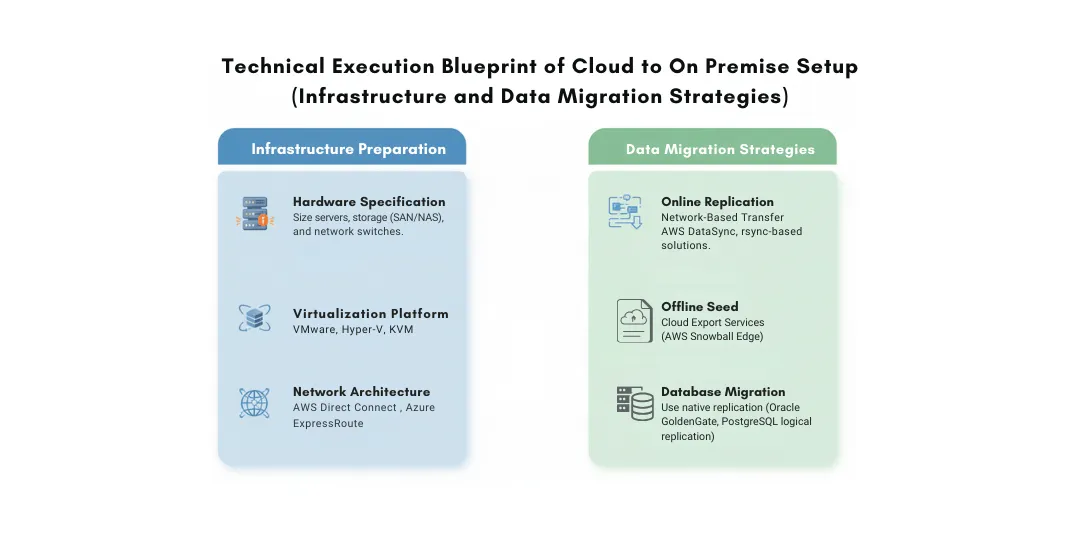
Infrastructure Preparation
- Hardware Specification: Size your servers, storage (SAN/NAS), and network switches based on performance baselines and growth projections.
- Virtualization Platform: Select and deploy your hypervisor (VMware, Hyper-V, KVM) and management stack.
- Network Architecture: Establish secure, high-bandwidth connectivity using dedicated private links such as AWS Direct Connect or Azure ExpressRoute when integrating with remaining cloud services, or leased lines/MPLS for private data center connectivity.
Data Migration Strategies
- Online replication: Using network-based transfer tools such as AWS DataSync (for AWS environments), rsync-based solutions, or vendor-neutral migration tools to synchronize data during a cutover window.
- Offline Seed: For petabytes of data, use Cloud Export Services (like AWS Snowball Edge for Export). This involves the provider loading your data onto a device and shipping it to your data center to avoid massive egress bandwidth bottlenecks.
- Database Migration: Use native replication (Oracle GoldenGate, PostgreSQL logical replication) or tools to create a synchronized standby on-premises before cutting over.
Application Migration
- Rehost (Lift & Shift): Simply moving VMs or containers. Fastest, but may not optimize for the new environment.
- Replatform: Modifying the application slightly to better leverage on-premises capabilities (e.g., integrating with local Active Directory, adjusting storage paths).
- Containerization: Packaging applications into Docker/Kubernetes pods can abstract them from the underlying infrastructure, making future moves easier.
Network & Security Considerations
- Identity Bridge: Extend or federate identity to ensure seamless user access across environments.
- Security Control Parity: Achieve security control parity by translating cloud security group intent into on-premises network firewall policies, and deploying equivalent controls such as web application firewalls (WAF), IDS/IPS, and endpoint protection - while acknowledging architectural differences between cloud-native and network-based security models.
- Monitoring Integration: Ensure that your on-premises systems feed into the same central monitoring and alerting platform.
Key Challenges & Mitigation Strategies
Downtime Management:
- Mitigation: Perform full rehearsal migrations and validate cutover steps in advance. Lower DNS TTLs well before migration while accounting for client-side and ISP-level caching that may delay propagation. Maintain a tested rollback plan and communicate realistic timelines and cache-related expectations to stakeholders.
Data Integrity & Consistency:
- Mitigation: Implement Write-Fencing or Read-Only modes during the cutover window to prevent data divergence (Split-Brain) between the cloud and on-premises environments.
Team & Skill Transition:
- Mitigation: Start training early by enabling cross-functional shadowing or over-the-shoulder support, where cloud engineers work alongside infrastructure teams to transfer operational knowledge. Update runbooks, escalation paths, and procedures well before cutover.
Post-Migration Optimization
The job isn’t done at cutover.
- Performance Tuning: Compare new performance metrics against your cloud baseline. Tune storage RAID levels, network configurations, and VM settings.
- Cost Tracking: Shift from analyzing cloud bills to tracking data center PUE (Power Usage Effectiveness), hardware utilization rates, and admin labor costs.
- Operational Excellence: Document new support procedures. Test your on-premises disaster recovery plan thoroughly. Integrate systems into your ITSM tool for ticketing.
Real-World Examples of the cloud to on-premises
1. 37signals (Basecamp & HEY) - The Cost Rebellion
What they did: Announced full exit from cloud in 2022
Why: Found cloud costs 5-7x more expensive than running their own hardware
Result: $7M projected savings over 5 years. CEO Jason Fried called cloud pricing “irrational” and regained performance control.
2. Dropbox - The $75 Million Infrastructure Bet
What they did: “Magic Pocket” project (2016-2017) moved 90%+ of user data from AWS
Why: Needed predictable costs at a massive scale (500+ petabytes)
Result: Saved nearly $75M over two years in operating costs, while improving performance for core file storage.
3. Zynga - The Gaming Giant’s Return
What they did: Moved 80% of game infrastructure to AWS (2009), then brought most back on-premises (2011-2012)
Why: Predictable workloads after initial viral growth; needed cost control for steady-state operations
Result: 75% reduction in compute costs and better performance for their stable gaming platforms.
Conclusion
Cloud repatriation isn’t about abandoning the cloud - it’s about using it more intelligently. As organizations mature, they’re realizing that not every workload thrives in a public cloud environment. Cost volatility, performance needs, compliance pressures, and architectural realities are pushing enterprises toward a more intentional hybrid strategy. Repatriation simply gives organizations greater control, predictability, and efficiency where it matters most.
The winning approach is not “cloud-only” or “on-prem-only,” but choosing the right environment for the right workload - and continuously reevaluating that decision as the organization evolves.
Evaluate before you migrate. Speak with our cloud and infrastructure experts today.
Frequently Asked Question
Get quick answers to common queries. Explore our FAQs for helpful insights and solutions.
The cloud-to-on-premises migration is the process of moving workloads, data, or applications from a public cloud back to on-premises or private infrastructure. It’s a strategic adjustment, not a rejection of the cloud.
Common reasons include unpredictable cloud costs, performance issues, strict compliance requirements, and better long-term economics for stable workloads.
It can be - especially for predictable, long-running workloads. CapEx investments often reduce the long-term total cost of ownership compared to ongoing cloud OpEx.
Downtime and data consistency issues. These can be minimized with phased migration, thorough testing, and defined rollback plans.
In most cases, no. Fully exiting the cloud is rarely the optimal strategy for modern enterprises. The cloud continues to offer unmatched benefits for elasticity, global reach, rapid experimentation, and disaster recovery.
February 12, 2026
DevSecOps Architecture Explained: Security as Code, Policy Automation, and GitOps
Chintan Viradiya
Author

January 22, 2026
FluxCD with Helm: Scaling Platform Governance via GitOps Reconciliation
Chintan Viradiya
Author
January 19, 2026
Site Reliability Engineering in Practice: Building Reliable Systems at Scale
Annavar Satish
Author

Optimize Your Cloud. Cut Costs. Accelerate Performance.
Struggling with slow deployments and rising cloud costs?
Our tailored platform engineering solutions enhance efficiency, boost speed, and reduce expenses.