
December 12, 2025
Continuous Deployment with FluxCD: Architecture, Flow & Best Practices

Chintan Viradiya
Author

Shyam Kapdi
Contributor

Rakshit Menpara
Reviewer
Continuous Deployment (CD) in cloud-native engineering is no longer just about automatically pushing code to production. It has evolved into a controlled, auditable, and continuously reconciled operational system - one that ensures production environments always reflect the declared intent of engineering teams. When implemented correctly, CD improves release predictability, minimizes human error, and enables teams to scale delivery without scaling operational risk.
Continuous Integration (CI) and Continuous Deployment (CD) are treated as distinct systems with separate responsibilities. CI focuses on code validation and build correctness, while CD governs how verified changes safely propagate into live environments. This separation is a critical architectural decision, and aligns with the principles discussed in our earlier deep dive on why CI and CD should operate independently.
GitOps has emerged as the dominant operating model for CD, and FluxCD is one of the most widely adopted engines implementing this model in production. In this guide, you’ll explore how Continuous Deployment works in a GitOps context, how FluxCD enforces production state from Git, and what it takes to design a deployment system that is both fast and operationally resilient.
What is FluxCD?
FluxCD is a set of Kubernetes controllers that continuously synchronize your cluster state with configuration stored in version control (typically Git). Developed by the CNCF-graduated Flux project, it implements GitOps principles by treating Git as the single source of truth for both application code and infrastructure configuration.
The fundamental difference between traditional CD and FluxCD’s approach:
- Push-based CD: External systems (like GitHub Actions) have credentials to make changes to production, executing scripts that “push” changes to environments.
- Pull-based GitOps: The cluster itself fetches configuration from Git and applies it, minimizing external access to production systems.
How FluxCD enforces the desired state in production
FluxCD runs inside your Kubernetes cluster, continuously monitoring your Git repositories for changes. When it detects a difference between what’s declared in Git and what’s running in the cluster, it automatically reconciles the state. This creates a self-healing system where manual changes to the cluster are eventually reverted to match the Git-declared state.
How FluxCD Works: The Deployment Lifecycle
Git as the single source of truth
Every configuration - from application deployments to network policies - resides in Git. This provides version history, audit trails, and rollback capabilities baked directly into your deployment process.
FluxCD operates on a reconciliation loop (typically every 1-5 minutes) where it:
- Fetches the latest configuration from Git
- Compares it with the current cluster state
- Calculates the differences
- Applies necessary changes to align the cluster with Git
Change detection, drift correction, and automated sync
When you commit a change to Git, FluxCD detects it through webhooks or periodic polling. If someone manually modifies a resource in the cluster (a common cause of “configuration drift”), FluxCD will detect this during its next reconciliation and revert the change to match Git.
Promotion across environments (dev → staging → prod)
FluxCD manages multiple environments through Git repository structures or separate repositories. Promotion typically involves updating a Git reference (like a Kustomize overlay or Helm values) that FluxCD detects and applies to the target environment.
FluxCD Architecture Explained
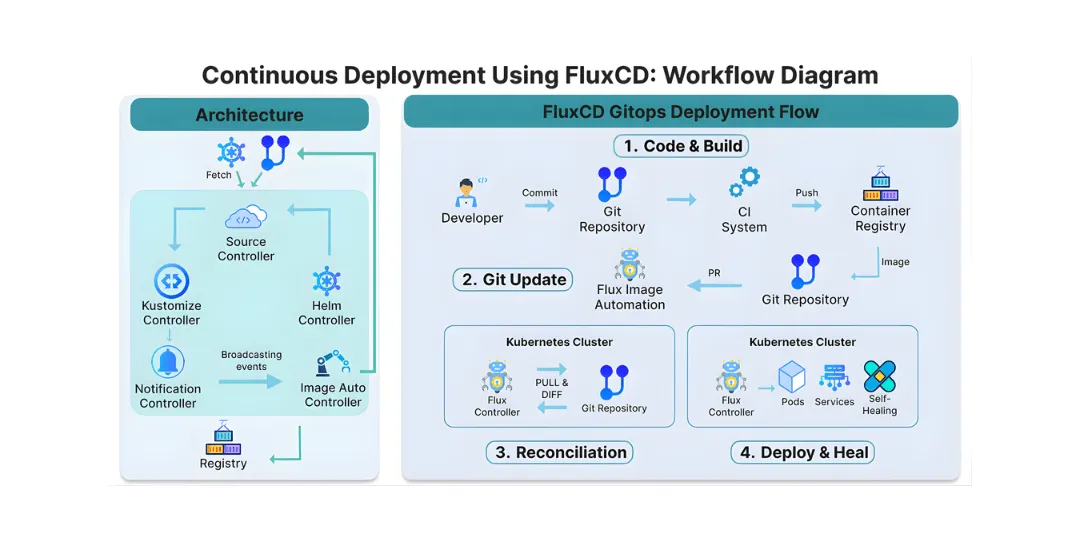
FluxCD’s modular architecture consists of several specialized controllers:
- Source Controller: Manages artifacts from external sources (Git repositories, Helm repositories, S3 buckets)
- Kustomize Controller: Applies Kubernetes manifests, supporting Kustomize overlays for environment-specific configurations
- Helm Controller: Manages Helm chart releases, handling Helm-specific lifecycle operations
- Notification Controller: Sends alerts to various providers about reconciliation events
- Image Automation Controllers: Automatically updates Git when new container images are available, closing the automation loop
How these components work together inside the cluster
These controllers work in concert: the Source Controller fetches artifacts, Kustomize/Helm Controllers apply them, the Notification Controller broadcasts changes, and Image Automation Controllers update source manifests when new images are available, creating a complete, closed-loop CD system.
Continuous Deployment (CD) Flow with FluxCD
Code committed → validated by CI → image built → Git updated → Flux deploys
1. Developer commits code
When a developer commits changes to the application repository and pushes them to the main branch. This action serves as the authoritative signal for downstream automation to commence.
git commit \-am "Feature update"

git push origin main
2. CI builds & pushes the image
Once the commit lands, the CI system executes the build pipeline. It packages the application into a Docker image, tags it with the unique commit SHA for traceability, and pushes the image to the container registry. At this point, the code has been transformed into a deployable artifact.
docker build \-t ghcr.io/org/my-app:${{ github.sha }} .

docker push ghcr.io/org/my-app:${{ github.sha }}
3. Flux detects a new image
Flux continuously monitors the configured container registry through the ImageRepository resource. When the newly published image tag appears, Flux registers it as a candidate for deployment without directly touching the cluster.
kind: ImageRepository

spec:

 image: ghcr.io/org/my-app
4. Flux updates Git via PR
Using ImageUpdateAutomation, Flux updates the Git-based deployment manifest with the newly detected image tag and opens a pull request. This preserves Git as the system of record and ensures all image changes pass through standard code review and approval workflows.
kind: ImageUpdateAutomation5. Flux deploys to Kubernetes
After the pull request is reviewed and merged, the Kustomization resource detects the configuration change. Flux then reconciles the live cluster state with Git, triggering Kubernetes to perform a controlled rollout of the new version.
kind: KustomizationSeparation of responsibilities between CI and CD
FluxCD enforces a clean separation: CI builds artifacts, CD deploys them. Your CI system never needs production credentials - it only needs to update Git. The cluster itself pulls and applies changes.
Also Read: Separating CI and CD: The Key to Faster, Safer Delivery
How promotion across environments works in GitOps
Promotion typically involves updating environment-specific configuration in Git. For example, you might have a kustomization.yaml in your production overlay that references a specific image tag. Promoting from staging to production involves updating that reference, which FluxCD then applies.
FluxCD vs Traditional CD Tools
Push-based pipelines vs Pull-based GitOps
Traditional tools like Jenkins, GitLab CI, or GitHub Actions use pipelines that execute commands against clusters. FluxCD inverts this: the cluster pulls its own configuration, reducing attack surface and simplifying access control.
Security model comparison
With traditional CD, your pipeline runner needs production credentials. With FluxCD, only the cluster itself needs to read Git repositories, and it applies changes internally. This follows the principle of least privilege more naturally.
Auditability and compliance
Every change with FluxCD originates from a Git commit, creating a natural audit trail. You can see who changed what, when, and why - directly in your Git history.
Production access control
FluxCD’s pull model means engineers don’t need direct cluster access for deployments. Combined with proper repository permissions and code reviews, this significantly reduces the potential damage from mistakes.
Also Read: Continuous Integration(CI) with GitHub Actions
Multi-Environment & Multi-Cluster Deployments with FluxCD
FluxCD excels in managing complex environments:
-
Environmental isolation: Separate Git repositories or branches map to clusters and namespaces, logically isolating dev, staging, and prod.
-
Scalability: FluxCD’s lightweight controllers run in each cluster, enabling management of hundreds or thousands of clusters without centralized bottlenecks.
-
Progressive delivery: Using GitOps workflows, progressive delivery patterns such as canary releases and blue-green deployments become declarative and automated.
Progressive Delivery & Release Strategies
Blue-Green deployments via Git
You can implement blue-green deployments by maintaining two complete sets of resources in Git and using a Git-based traffic switching mechanism. FluxCD will ensure both environments are correctly configured.
Canary releases with Flux
For progressive delivery, FluxCD integrates with Flagger, which handles the full lifecycle of a canary release - gradually shifting traffic, monitoring KPIs, and rolling back automatically if the metrics indicate a problem.
Feature flag alignment with GitOps CD
Feature flags can be managed as configuration in Git alongside your application code. FluxCD ensures flag configurations are consistently deployed across environments.
FluxCD vs ArgoCD
Architectural differences
FluxCD uses a multi-controller, operator-based architecture, while ArgoCD uses a more monolithic server-agent model. FluxCD’s controller-based approach aligns more naturally with Kubernetes’ own architecture.
UX vs automation-first philosophy
ArgoCD offers a rich web UI for visualization and manual operations. FluxCD focuses more on automation and API-driven operations, though it does include basic UI capabilities.
Which tool fits which organization
FluxCD often fits better in organizations prioritizing:
- Automation-first approaches
- Integration into existing Git workflows
- Large-scale, multi-cluster deployments
- Organizations are already comfortable with Kubernetes operator patterns
What Makes FluxCD Different?
FluxCD operates as a Kubernetes operator that continuously monitors your Git repositories and container registries. When it detects changes - whether in your application code, Helm charts, or Kubernetes manifests - it automatically synchronizes those changes to your cluster. This “pull-based” model flips traditional CD on its head, offering several key advantages:
- Declarative Configuration: Your entire system state is defined in Git
- Automated Synchronization: Changes are applied automatically without manual intervention
- Audit Trail: Every change is tracked through Git commits
- Multi-Tenancy Support: Secure CD for multiple teams and applications
Best Practices for Production-Grade FluxCD
Repository structure standards
Adopt a consistent structure. One common pattern:
text

├── apps/
│   ├── base/
│   ├── staging/
│   └── production/
├── infrastructure/

└── clusters/
Environment promotion patterns
Choose and consistently apply a promotion pattern - either promotion through Git branch merging or through directory/overlay updates.
Image automation strategy
Use Image Automation Controllers judiciously. Consider requiring manual approval for production image updates while automating development environments.
Branching strategies for GitOps
Many teams succeed with trunk-based development for configuration, using short-lived branches for changes that are merged after review.
Conclusion: CD with FluxCD
FluxCD is a powerful tool that aligns perfectly with cloud-native principles and enterprise compliance requirements. By making Git the single source of truth and enabling pull-based reconciliations, Flux reshapes release engineering into a transparent, auditable, and controllable operation.
As organizations accelerate digital transformation, FluxCD offers a future-proof continuous deployment system that enhances security, scalability, and operational confidence in the GitOps paradigm.
Frequently Asked Question
Get quick answers to common queries. Explore our FAQs for helpful insights and solutions.
Yes. FluxCD is designed for multi-environment and multi-cluster deployments. Each cluster runs its own set of controllers, allowing scalable management without a centralized control plane bottleneck.
In FluxCD, all desired cluster states - including applications, infrastructure, and policies - are declared and stored in Git repositories. FluxCD continuously reconciles the live cluster state against Git, enabling version history, rollback, and audit trails for every change.
Push-based CD tools execute deployment commands from an external system directly against clusters, requiring credentials with broad access, which can increase risk. Pull-based CD, like FluxCD, lets clusters pull configurations from Git, minimizing external access and enforcing least privilege.
FluxCD is lightweight, automation-first, with modular Kubernetes controllers; ArgoCD offers a rich web UI and app-centric management. Flux suits operator-native, multi-cluster automation; ArgoCD fits teams needing visual sync control and RBAC.
FluxCD is a GitOps-based Continuous Deployment tool that runs inside Kubernetes clusters. Unlike traditional push-based CD tools that push changes directly to production, FluxCD uses a pull-based approach where the cluster continuously pulls configuration from Git and applies it. This reduces external access requirements and improves security and auditability.
Written by
Chintan Viradiya
Chintan Viradiya is a DevOps Engineer at Improwised Technologies. Passionate about Infrastructure as Code and CI/CD pipelines, he focuses on optimizing cloud deployments and enhancing the security and performance of modern applications. He plays a key role in ensuring high availability and driving DevOps best practices across projects


February 12, 2026
DevSecOps Architecture Explained: Security as Code, Policy Automation, and GitOps
Chintan Viradiya
Author


January 22, 2026
FluxCD with Helm: Scaling Platform Governance via GitOps Reconciliation
Chintan Viradiya
Author


January 19, 2026
Site Reliability Engineering in Practice: Building Reliable Systems at Scale
Annavar Satish
Author

Optimize Your Cloud. Cut Costs. Accelerate Performance.
Struggling with slow deployments and rising cloud costs?
Our tailored platform engineering solutions enhance efficiency, boost speed, and reduce expenses.