
November 26, 2025
Deploy Your Own ChatGPT Alternative with LiteLLM Proxy and OpenWebUI

Annavar Satish
Author

Nandini Parekh
Contributor

Rakshit Menpara
Reviewer
Companies are looking for private ChatGPT-like software mostly due to the fact that they require complete control over their data, as well as to comply with the requirements of law more quickly and also need to ensure that their expenses remain stable. Outside AI services are often associated with issues including the transfer of data off-site, which creates security concerns, a sudden increase in expenses and the difficulty of coordinating strict industry guidelines. This is why a lot of teams look at running large models within the company, as it is easier to manage.
LiteLLM with OpenWebUI addresses these issues by providing a safe and expandable web-based chat system that is integrated into corporate systems. Instead of managing multiple applications, LiteLLM works like a middle layer, handling multiple AI backends in one go. OpenWebUI offers users a user-friendly chat screen that is similar to many popular consumer applications.
The most important benefits for businesses include:
- Privacy of data: Traffic can be kept in private networks, and model providers are limited to vetted suppliers or model providers who self-host their models.
- Control: Teams from the Platform decide what models are accessible to which contexts and which guardrails cover responses and requests.
- Cost and compliance: Centralised routing and budgeting can reduce API waste and assist in enforcing internal and regulatory risk guidelines.
This guide will explain the process of building the platform and walk you through the setup process, as well as provide solid suggestions for ensuring security and outline methods to save money, aiding companies to create and operate AI chat systems with no hassle.
Also read: 7 Signs Your Organisation Needs Platform Engineering.
What exactly is LiteLLM?
LiteLLM serves as a middleman, combining several large language model services into a seamless interface.
It allows you to manage model routing, establish speed limits, offer an all-in-one API entry as well and record expenses. This makes the addition of diverse AI tools a breeze, because of a consistent configuration and centralised management features all within one location. The system supports business usage by allowing switching between different vendors if required and monitoring spending patterns, and ensuring that rules regarding usage are adhered to.
- Unified proxy to multiple LLM providers
- Model routing allows for flexibility and dependability
- Limiting the rate of usage for controlled use
- API unification simplifies development
- Cost logs to monitor financial control
What exactly is OpenWebUI?
OpenWebUI is a tool for free which functions like ChatGPT but is run in your browser. It allows you to talk to a variety of AI models simultaneously and pulls data from other sources as needed, meaning that responses are more accurate with real-time data, instead of simply making assumptions.
It integrates with embeddings, while offering login capabilities, so large companies’ teams are able to use it with ease. When it is combined with LiteLLM and LiteLLM, you have an entire setup. Users chat with OpenWebUI, and backend queries are handled smoothly with tight security.
- An open-source interface that is similar to ChatGPT
- Supports multi-model chat and workflows for RAG
- Uploading and embedding support
- Access control and user authentication
- It complements LiteLLM by integrating UI
Also read: Top AI App Development Platforms: How AI is changing the way Apps are Built?
What LiteLLM Proxy and Open WebUI Bring Together
- LiteLLM as an integrated LLM API layer
- Provides an OpenAI-style API, while routing to numerous Backends (OpenAI, Anthropic, Google, Mistral, Ollama, and more).
- Normalises differences between providers so that applications and tools can communicate with one proxy, not a variety of SDKs from different vendors.
- Open WebUI as the internal ChatGPT-style interface
- It provides a chat interface that is browser-based, modelling selections, historical and file interaction.
- Connects to LiteLLM just as if it were an OpenAI interface, so users have one interface, while the backend is flexible.
- Why is this combination suited to business requirements
- UI as well as routing is separated: UI teams manage UX, and platform teams oversee models and service providers.
- Governance logs, cost, and control are all part of LiteLLM Adoption, and usability is on Open WebUI.
Enterprise Deployment Requirements
Installing the system requires selecting the right hardware for how it’s going to be employed. To run local processes, choose GPU-powered virtual machines. Make sure they’ve got enough RAM and power. If you’re only operating a proxy, standard CPU-driven VMs will work fine. You’ll require Docker installed, as well as Docker Compose. You can also add GPU drivers only when needed.
Networks are set up by changing firewalls so that components can communicate in a safe manner, through rules that govern access. Instead of blocking all connections to the internet, certain routes are created to allow data flow, keeping everything safe without slowing connections.
Solutions for managing secrets, such as HashiCorp Vault or AWS Secrets Manager, are crucial for keeping API keys and credentials that are sensitive safe.
- Hardware: GPU-enabled VMs to run local models, and CPU-based for proxy
- Software such as Docker and Docker Compose, a Local GPU driver for LLMs
- Network: Secure Firewall and port configuration
- Management of secrets to secure the API key and credentials
Also read: Secrets, State and Storage: Managing sensitive infra Data Security-wise
Step-by-Step Guide to Deployment
Install and configure the LiteLLM Proxy
- Make use of Docker Compose using a YAML provided to start LiteLLM
- Set up API keys for providers (OpenAI, Azure, Anthropic, Groq, GGUF local models)
- Allow logging, set rate limits, and define the key management guidelines
- Active enterprise features, such as cost tracking and model failover
Deploy OpenWebUI
- OpenWebUI by using Docker Compose that is connected to LiteLLM
- Configure the connection settings to funnel requests through the LiteLLM proxy
- Allow user authentication as well as RBAC for restricted access
- Modify the display of models and allow multi-model interaction functions
Building Enterprise-Grade Capabilities
Authentication & Single Sign-On (SSO)
- Incorporate SAML, OAuth, or LDAP to create enterprise SSO
- Define roles for users and their permissions
- Modify access policies for models for each person or group
Monitoring and Observability
- Implement log management using ELK stack, Grafana or Prometheus
- Track the volume of requests in terms of latency, volume, and usage
- Track usage and cost patterns to budget
Security Hardening
- Make sure to enforce HTTPS on all your services
- Make use of firewall and network segmentation policies as well as firewall segments.
- Use prompt filtering to stop leaks of data
- Implement zero-trust network access controls
Governance and Compliance
- Allow audit logs for every interaction
- Define data retention and secure deletion policies
- Assist in aligning operations to ISO 27001, SOC2, or any other standards.
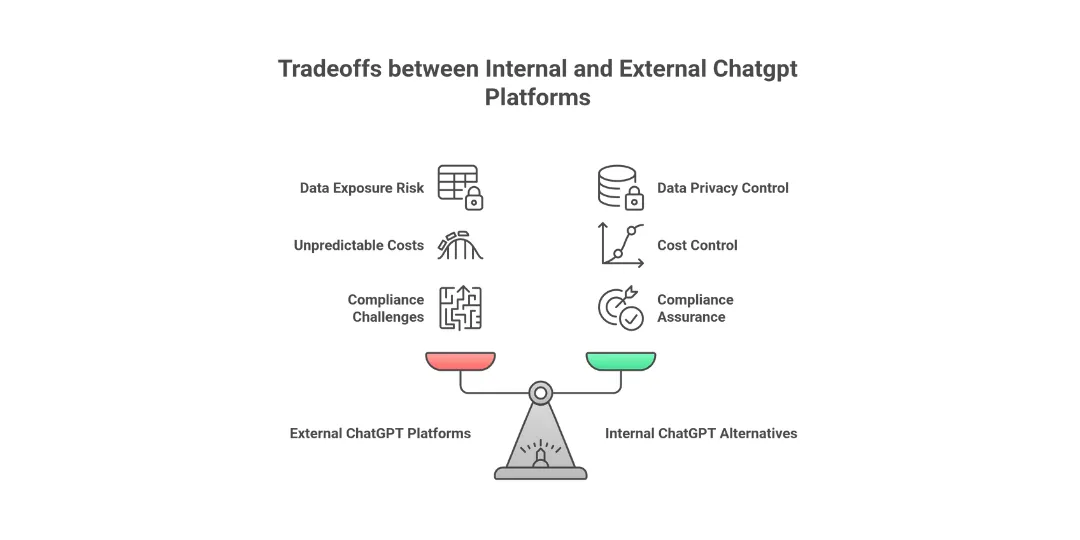
The Reasons Enterprises Use Internal ChatGPT Alternatives
- Reduce data exposure to external SaaS
- Keep all prompts, responses and logs within your personal system or VPC.
- Beware of sending sensitive documents or codes to chat rooms that you do not manage.
- Establish a standard AI entrance point that employees can use
- Replace the scattered AI experiments with a single managed, controlled interface.
- Reduce shadow IT by providing an officially supported tool that integrates into SSO as well as internal policy.
- Control costs and patterns of usage centrally
- The aggregate spend of multiple companies behind a single proxy.
- Set rate limits, quotas and per-team budgets instead of allowing each account to use.
- Comply with audit and compliance requirements
- Who used which model, from what data source and at what point?
- Keep records in order to assist with the GDPR and industry audits and internal investigations.
Cost Optimization Strategies
The need to cut costs is essential for large-scale software for languages, whether on the internet or locally. Web-based services typically cost per token processed, which makes monitoring usage a smart way to avoid unexpected costs. Utilising personal GPUs helps with recurring payments; however, it requires early payment to purchase hardware, while also managing installation issues.
LiteLLM keeps track of tokens and connects every token to a specific API model and key. This way, businesses have an accurate picture of their spending, which makes it much easier to keep costs in check while balancing performance. Instead of making assumptions that their assumptions are correct, they use facts to determine the most appropriate strategy. The decision-making process shifts from intuition to actual numbers.
Simple tasks can be sent to budget-friendly options or on-site systems, while the most urgent or highest-priority jobs access more expensive, speed-oriented cloud configurations instead.
- Compare costs among cloud-hosted LLM APIs and hardware for local inference
- Make use of LiteLLM’s cost tracking feature to track your spending
- Models for routing based on the workload kind and price constraints
- Utilise caching to decrease the number of tokens used and API calls
Also read: Kubernetes Monitoring and Observability Stack Setup: The Best tools and cost monitoring
Troubleshooting & Common Pitfalls
The interface isn’t working properly. Problems with linking to the proxy appear occasionally - typically because the endpoints aren’t properly set or firewalls hinder access. Verify that the website addresses are correct and ensure that the required ports are able to allow traffic to pass through. If too many requests are hit at the same time, rate limits begin to apply; adjusting those limits helps, but spreading calls is equally effective.
Certain services are slow to respond by turning on LiteLLM’s failover feature. This allows you to switch between different models before delays start to pile up. Instead of waiting around, it switches to a backup model automatically whenever there are hiccups. This helps keep things running without becoming stuck in the middle.
GPU limits when running locally can be caused by the limited memory of VRAM or a slow processor - observe how it’s utilised, and alter the settings for power to aid.
- Verify API endpoints and port access between OpenWebUI, as well as the LiteLLM proxy
- Verify API keys for validity as well as permit details.
- Increase the speed limit or increase the allowance if the vehicle is slowing down
- Switch on model switching in LiteLLM to ensure that replies continue to work even if one fails
- Pay attention to GPU as well as CPU usage to identify slowdowns. Adjust the way resources are allocated
- Review logs for any mistakes or indications of slow responding times.
Also read: How to Troubleshoot Kubernetes: How to Identify and Fix Problems Like a Professional?
Gaps in other ChatGPT Platforms
Certain open ChatGPT websites don’t provide clear information on how they manage information or safeguard it. This can be a risk for businesses that require strict supervision. They’re usually unable to limit access by job title or by team members through conditional rules.
The majority of systems don’t connect several models, and so reducing costs or utilising different AIs can be a challenge. Some companies set strict limits on their use, while also blocking tools from outside, which can slow down company setups, or monitoring usage statistics or spending. There’s a good chance you’ll require more than one monitor.
- Insufficient information on how data is used, as well as weak security measures
- Permissions that are controlled, that are based on roles and models, but with separate rules, not the blanket configuration
- It is not possible to switch among different paths or alternative options
- There are restrictions from the seller about what you can do with or connect to it
- A few choices keep track of costs or combine them
Security and Compliance Models
- Make sure keys and tokens are secured.
- Keys for Store Providers, LiteLLM admin keys, and virtual keys are kept in private managers.
- Make keys rotate according to a schedule and immediately revoke them if there is a suspicion of a breach.
- Control of network paths and data residence
- Make use of firewalls and network policies so that LiteLLM connects to outside model endpoints.
- Choose regional endpoints and service providers that offer mandatory data residency assurances.
- Help with regulatory requirements
- Establish the rules for data retention and deletion to monitor chat messages and notifications. Do not store personal data that you don’t need.
- The document should identify the providers who are processors and make sure that the contract is in line with regulations.
- Allow the ability to audit and manage.
- Record which team or user utilised which model, and what data source was used and at what point.
- Review processes should be established in the case of new data integrations. Set up prompts that impact security, as well as RAG connections to data that is regulated.
The Future of Self-Hosted AI
- Change from general chat to task-specific agents
- Develop specialised assistants to legal, finance or data analysis operations based on the identical LiteLLM as well as the Open WebUI foundation.
- Add additional APIs and tools to allow assistants to initiate workflows, and not just create text.
- Improve integration with enterprise systems.
- Make connections to BI platforms and ticketing software, CRM and data warehouses to ensure that users can get answers in lieu of manual reports.
- Make use of the proxy layer to unite log-in, authentication and rate limiting across all of these integrations.
- Get ready for the new ecosystems that model.
- Maintain the LiteLLM configuration flexibly, which means new GPU providers and on-prem clusters can be added easily.
- Treat models as pluggable resources that are swappable without having to rewrite the interface for the user.
Conclusion
LiteLLM, coupled with OpenWebUI, allows firms to use the AI chats in-house. Instead of relying on external platforms, this combination addresses issues such as data privacy and compliance, as well as costs and flexibility. By using them, as shown that a company can use powerful language technologies while ensuring that oversight is tight.
Frequently Asked Question
Get quick answers to common queries. Explore our FAQs for helpful insights and solutions.
Written by
Annavar Satish
Satish is seasoned DevOps Engineer with strong expertise in CI/CD and cloud-native practices. Experienced with Git, Docker, Kubernetes, K3s, Helm, Rancher, Prometheus, Grafana, and alerting systems to ensure reliable software delivery. Passionate about innovation, I’ve also integrated tools like Frigate, DeepStack, DoubleTake, CompreFace, and IoT technologies to optimize and automate workflows.
February 12, 2026
DevSecOps Architecture Explained: Security as Code, Policy Automation, and GitOps
Chintan Viradiya
Author



January 22, 2026
FluxCD with Helm: Scaling Platform Governance via GitOps Reconciliation
Chintan Viradiya
Author

January 19, 2026
Site Reliability Engineering in Practice: Building Reliable Systems at Scale
Annavar Satish
Author
Optimize Your Cloud. Cut Costs. Accelerate Performance.
Struggling with slow deployments and rising cloud costs?
Our tailored platform engineering solutions enhance efficiency, boost speed, and reduce expenses.