
December 10, 2025
CI with GitHub Actions: End-to-End Pipeline Setup Guide

Chintan Viradiya
Author

Shyam Kapdi
Contributor

Rakshit Menpara
Reviewer
Continuous Integration(CI) with GitHub Actions: End-to-End Pipeline Setup Guide
Software teams ship code at a pace where manual testing, delayed builds, and late-stage bug detection create delivery risk. When code changes are not validated immediately, defects move closer to production, release cycles slow down, and engineering teams lose visibility into the stability of their builds.
This is where Continuous Integration (CI) with GitHub Actions becomes a core operational layer. By automating build, test, and validation workflows directly inside GitHub, teams remove dependency on manual checks and external CI tools. Every code change is verified at the moment it is introduced, reducing integration conflicts and enforcing consistent quality standards.
What is Continuous Integration (CI)?
Continuous Integration is a software development practice where developers regularly merge their code changes into a central repository, after which automated builds and tests are run. The primary goal is to catch integration errors as quickly as possible, improve software quality, and reduce the time taken to validate and release new updates.
CI has evolved from a “nice-to-have” to an essential practice. Teams that implement CI effectively can:
- Release software more frequently and reliably.
- Reduce manual testing overhead.
- Improve collaboration between developers.
- Catch bugs before they reach production.
Learn how CI benefits developers beyond DevOps practices through immediate feedback loops and proactive incident prevention.
Why Choose GitHub Actions for CI?
There are many CI tools (Jenkins, GitLab CI, CircleCI, etc.), but GitHub Actions stands out for most teams because:
- Native integration - Lives in the same place as your code and pull requests, if you are a GitHub user already, that is.
- Configuration as Code - YAML-based configuration stored alongside code (.github/workflows/), version-controlled, and reviewable in PRs.
- Huge community - Over 20,000 official and community actions for almost any task imaginable.
- Free-tier allocation - 2,000 minutes/month are free for public repositories and private repositories on the free plan, with generous limits for open-source projects.
- Matrix builds & parallelism built-in, you can run tests on different operating systems and language versions using just a few lines of YAML.
How CI Works in GitHub Actions
1. Triggers
Triggers define when a CI workflow runs. Common triggers include:
push- Runs CI when code is pushed to a branchpull_request- Runs CI when a pull request is opened or updatedworkflow_dispatch- Allows manual execution
These triggers determine exactly when validation begins.
2. Workflows
A workflow is the top-level definition of your CI pipeline. It is defined as a YAML file in the .github/workflows/ directory and describes:
- What triggers the pipeline
- What jobs will run
- In what order does execution happen
Each repository can contain multiple workflows, each serving a different purpose (build, test, security scan, etc.).
3. Jobs
A job is a logical group of steps that run on the same runner. A workflow can contain multiple jobs that:
- Run sequentially
- Or run in parallel for faster execution
Jobs define the execution boundaries inside a workflow.
4. Steps
Steps are the individual commands executed inside a job. They run sequentially and typically include:
- Checking out code
- Installing dependencies
- Running tests
- Building artifacts
Each step represents a single unit of execution.
5. Actions
Actions are reusable automation components used inside steps. They encapsulate common functionality like:
actions/checkoutfor pulling codeactions/setup-nodefor configuring runtimes- Custom third-party actions
Actions allow teams to avoid writing repetitive scripting logic.
6. Runners
A runner is the machine that executes the job. GitHub provides:
- Hosted runners (Linux, Windows, macOS)
- Self-hosted runners for private infrastructure
All steps inside a job execute on the same runner instance.
7. Matrix Builds
Matrix builds allow the same job to run across multiple environments simultaneously, such as:
- Different Node, Python, or Java versions
- Different operating systems
This ensures broad compatibility with minimal configuration.
8. Caching
Caching stores dependencies between workflow runs to avoid repeated downloads. This:
- Reduces pipeline execution time
- Keeps building fast and predictably
9. Artifacts
Artifacts are files produced by the pipeline that can be:
- Stored after the run
- Downloaded later
Core Stages of a CI Pipeline
1. Checkout Code (actions/checkout@v6)
The pipeline begins by checking out the repository code into the runner’s workspace. This step uses the official GitHub action to sync the latest commit for the workflow.
text
name: Checkout code

uses: actions/checkout@v6
2. Install Dependencies (npm install / pip install / mvn install)
Dependencies required for building and testing the application are installed using project-specific package managers.
text
- name: Install dependencies

  run: npm install
3. Linting (eslint . / flake8 . / golangci-lint run)
Static code analysis tools scan the codebase for syntax errors, style issues, and potential bugs before tests run.
text
- name: Run linter

  run: npm run lint
4. Unit Tests (npm test / pytest / go test ./...)
Automated tests validate the correctness of individual units or components to catch regressions early.
text
- name: Run unit tests

  run: npm test
5. Build and Package (npm build / mvn package / go build)
The application is compiled or packaged into deployable artifacts required for delivery or deployment.
text
- name: Build application

  run: npm run build
6. Upload Artifacts (actions/upload-artifact@v6)
Build outputs, test reports, or logs produced in earlier steps are uploaded as pipeline artifacts for use in later stages or downloads.
text
- name: Upload build artifacts

  uses: actions/upload-artifact@v6

  with:

    name: build-output

    path: ./dist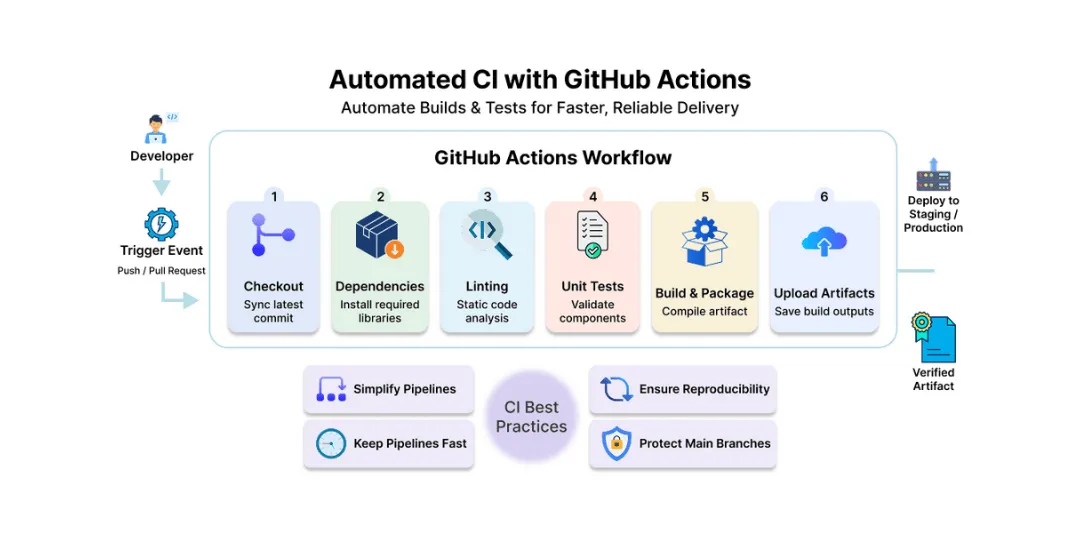
Best Practices
To maximize CI effectiveness on GitHub Actions, consider the following best practices:
- Keep pipelines as simple as possible: Avoid unnecessary steps and over-engineering.
- Keep pipelines fast: A typical CI pipeline completes within 5 minutes or less-the faster the feedback, the better the developer experience. Cache dependencies and build outputs to minimize redundant downloads and save build time.
- Ensure pipeline reproducibility: What works today should keep working tomorrow unless intentionally changed. This is achieved through fixed configurations, deterministic builds, and controlled environments.
- Protect main branches: Implement branch protection rules requiring passing CI checks before code merges to maintain repository stability.
Common Pitfalls
Many teams face recurring challenges when implementing GitHub Actions for CI:
- Long build times: Inefficient pipelines or unoptimized dependency management can slow feedback loops.
- Flaky tests: Unstable tests lead to inconsistent pipeline outcomes, eroding trust in CI results. Advanced teams implement self-healing CI pipelines that automatically recover from failures through retry mechanisms and automated diagnostics.
- Secrets leaking: Accidentally exposing sensitive environment variables or secrets in logs can lead to security breaches. Learn how DevSecOps practices secure CI/CD pipelines through automated secrets vaulting, security scanning, and policy enforcement.
- Overusing third-party actions: Excessive reliance on unverified external actions can introduce vulnerabilities or break pipelines unexpectedly.
From CI to CD: The Natural Next Step
CI’s job ends when you have a verified, built artifact. Continuous Deployment (CD) takes that artifact and pushes it to staging or production.
Separating CI and CD is a best practice because:
- You can promote the same artifact that passed CI.
- Deployment policies (manual approval, canary, etc.) stay independent of testing logic.
- Different teams or permissions can control deployment.
Also Read: Separating CI and CD: The Key to Faster, Safer Delivery
Conclusion
Continuous Integration(CI) with GitHub Actions equips teams with a seamless and integrated platform for automated code validation. The benefits include early defect detection, consistent delivery quality, and faster development cycles that align engineering outcomes with business objectives.
Frequently Asked Question
Get quick answers to common queries. Explore our FAQs for helpful insights and solutions.
Continuous Integration is a development practice where developers merge code changes frequently, triggering automated builds and tests to detect integration problems early.
GitHub Actions offers native integration within GitHub, easy YAML-based workflow configuration, a large marketplace of reusable actions, and support for matrix builds and caching.
CI workflows trigger on repository events like pushes and pull requests, running jobs composed of sequential steps on virtual runners, including build, test, and lint stages.
Common challenges include long build times, flaky tests, accidental secret exposure, and over-reliance on third-party actions.
CI validates and builds code artifacts, while CD automates their deployment, maintaining separation for better control and reliability.
Written by
Chintan Viradiya
Chintan Viradiya is a DevOps Engineer at Improwised Technologies. Passionate about Infrastructure as Code and CI/CD pipelines, he focuses on optimizing cloud deployments and enhancing the security and performance of modern applications. He plays a key role in ensuring high availability and driving DevOps best practices across projects


February 12, 2026
DevSecOps Architecture Explained: Security as Code, Policy Automation, and GitOps
Chintan Viradiya
Author

January 22, 2026
FluxCD with Helm: Scaling Platform Governance via GitOps Reconciliation
Chintan Viradiya
Author

January 19, 2026
Site Reliability Engineering in Practice: Building Reliable Systems at Scale
Annavar Satish
Author

Optimize Your Cloud. Cut Costs. Accelerate Performance.
Struggling with slow deployments and rising cloud costs?
Our tailored platform engineering solutions enhance efficiency, boost speed, and reduce expenses.