
June 2, 2026
Why Your AI Is Too Slow (And How to Fix It)

Chandan Teekinavar
Author

Shyam Kapdi
Contributor

Rakshit Menpara
Reviewer
I have watched a lot of AI features get built and die quietly.
Not because the idea was bad. Not because the model gave wrong answers. But because users clicked away before the answer even showed up.
That is the real problem nobody talks about in the boardroom. We spend months picking the right AI model, writing the perfect prompts, and getting the integration right, and then users abandon the product because the first word takes six seconds to appear on screen.
Six seconds feels like a minute when you are waiting for a response. And users do not wait.
The Problem Isn’t the AI Model, It’s How You’re Routing Requests
Here is what I see happening at most companies that ship AI features:
Every single request, whether someone is asking “what is the status of my order?” or “summarize this 40-page contract,” goes to the same model. The big one. The heavy one. The one that takes the longest to start responding.
This makes no sense when you step back and look at it.
Think of it like staffing a help desk. You would not send every incoming call, including “what are your office hours?”, to your most senior expert with a full queue. You would have someone at the front handle the simple stuff immediately and pass the complex cases to the expert.
AI models work the same way. There are small, fast models built to handle simple tasks in under a second. There are large, slow models built to handle complex reasoning, long documents, and nuanced decisions. Using the large model for everything is like paying for a private jet every time you need to cross the street.
What Is Time-to-First-Token (TTFT) and Why It Kills User Retention
There is a term engineers use called Time-to-First-Token, or TTFT. It simply means: how long does the user wait before they see the first word of a response?
You do not need to memorize this term. But you need to understand what it costs you.
If TTFT is under one second, users feel like the product is responsive. If it is two to three seconds, they notice the wait. If it crosses five seconds, a significant number of them will close the tab, go back, or just stop using the feature altogether.
Every company I have worked with when building autonomous AI agents has been surprised by how much user drop-off occurs in those first few seconds. Not at the checkout page. Not after a bad response. Right there at the loading spinner.
This is not a technical problem. It is a business problem. Slow AI kills adoption before the product even gets a fair shot.
How to Fix Slow AI Response Times With Smart Model Routing
The fix is not complicated. It requires one shift in thinking:
Not every question deserves the same answer pipeline.
A user asking “Is my invoice paid?” should get an answer in under a second. That question requires no heavy reasoning. A small, fast model can handle it.
A user asking “review this contract and flag any unusual clauses”, that actually needs the heavy model. It involves reading, judgment, and nuance.
What good teams do is look at the types of requests coming in and sort them. They send simple, short, predictable requests to fast models. They send complex, multi-step, open-ended requests to the more capable but slower models.
This is called traffic routing, but you do not need to call it anything. The concept is simple: match the request to the right tool for the job. Do not use a sledgehammer to crack open an envelope.
When teams do this well, the results are visible fast. Response times drop. Users stop dropping off. The product starts to feel snappy rather than sluggish. (Read how we optimized performance in our case study on building a Cloud-Native Managed Solution for a leading AI Orchestration Platform).
The One AI Performance Metric Most Teams Aren’t Tracking
Most teams track whether the AI gave a correct answer. That matters. But it is not the only thing that matters.
Here is what I tell every team I work with: also track how long before the user saw the first word of a response. That number will tell you more about your product experience than almost any other metric.
If you are not measuring it today, you are flying blind on one of the most important parts of your user experience. (And while you’re tracking performance metrics, you should also ensure you aren’t overspending. Check out our guide on how to stop burning cash on AI tokens and track what matters.
Some things worth knowing about your own AI setup:
- What percentage of your requests are simple versus complex?
- What is the average wait time before a response starts showing?
- At what point in the wait do users abandon the session?
- Are you sending everything to one model, or are you routing based on the type of request?
You probably do not have answers to all of these right now. That is worth fixing.
Why Speed Is a Product Decision, Not Just an Engineering One
There is a conversation that happens in a lot of leadership meetings where someone says, “Users just need to get used to it; AI takes time.”
That is not true. Users are not waiting for AI in general. Users are waiting for your AI. And if your competitor’s AI answers in one second and yours answers in five, users will choose theirs. Not because it is smarter. Because it feels better.
Speed is part of the product. It is not a nice-to-have. It is the first thing a user experiences, and the first thing they judge.
The teams that figure this out early, that monitor their response times, that route traffic properly, that match the model to the task, end up with better retention, more daily active usage, and users who actually trust the product.
The teams that ignore it spend months wondering why users are not coming back.
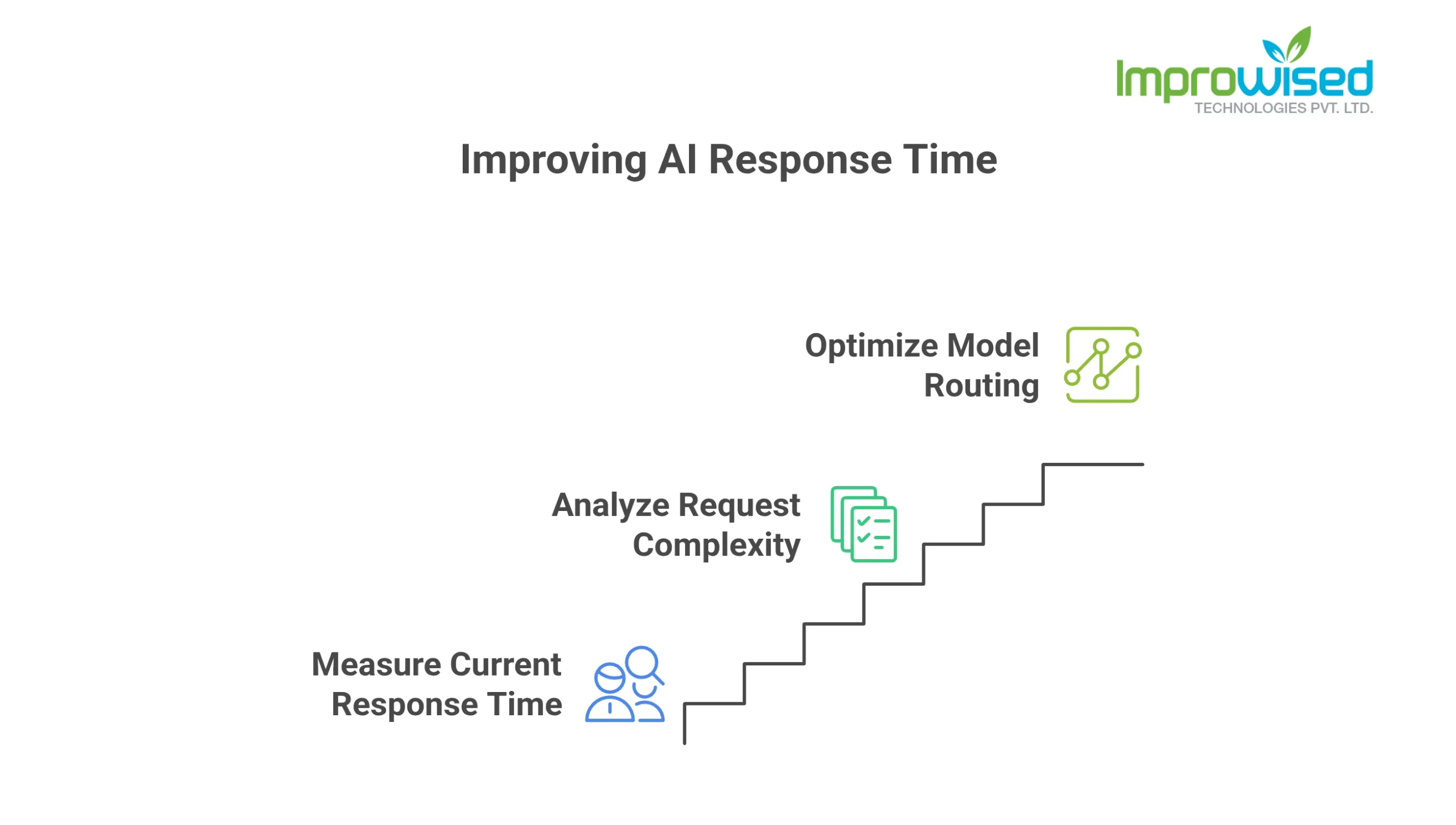
3 Steps to Improve AI Response Time Starting This Week
You do not need to rebuild your entire AI architecture. Start here:
Step one: Find out what your current average response start time is. If nobody knows this number, that is your priority.
Step two: Look at the last 1,000 requests your AI handled. How many were simple? How many actually required your heaviest model?
Step three: If you are routing everything to one model, talk to whoever manages that infrastructure about whether a faster model could handle the simple traffic (or get an infrastructure and architecture review).
That is it. Three steps. None of them requires a major project.
Final Thought
We talk a lot about AI quality, whether the answers are accurate, whether the model is safe, and whether it handles edge cases well. All of that matters.
But the user never gets to judge any of that if they leave before the answer appears.
Speed is what gets users to the answer. Everything else is secondary.
If your AI feature is not performing the way you hoped, if adoption is lower than expected, if users are not returning, check the wait time before anything else. It is very often the real problem, and it is almost always fixable. Ready to speed up your AI features and stop losing users? Contact us today to see how we can help you optimize your model routing.
Frequently Asked Question
Get quick answers to common queries. Explore our FAQs for helpful insights and solutions.
Users typically abandon AI features because of unacceptable wait times, not inaccurate outputs. If the wait time crosses five seconds, a significant number of users will close the tab before the AI even has a chance to respond. Speed is the primary user experience metric that dictates product adoption and retention.
Most AI infrastructure suffers from latency because every single request is routed to a massive, heavyweight model. Sending a basic status query to a model built for complex reasoning and long-document analysis is highly inefficient. To fix this, you must implement smart model routing to match the complexity of the prompt to the appropriate model size.
Time-to-First-Token (TTFT) measures the exact wait time before a user sees the first word of an AI-generated response. If TTFT is under one second, the application feels highly responsive. Tracking this metric is critical; without it, platform teams are flying blind regarding user drop-off and overall infrastructure performance.
Smart routing acts as an architectural triage system. It directs short, predictable queries to fast, lightweight models capable of sub-second responses. Meanwhile, it reserves heavy, complex models strictly for multi-step reasoning and nuanced tasks. This optimization immediately drops response times, prevents traffic bottlenecks, and makes the application feel snappy.
First, establish a baseline by measuring your current average response start time (TTFT). Second, audit your last 1,000 AI requests to determine the ratio of simple versus complex queries. Finally, configure your infrastructure to route the simple traffic to faster, lightweight models rather than forcing all traffic through a single, slow pipeline.
Written by
Chandan Teekinavar
Chandan Teekinavar is a DevOps Engineer at Improwised Technologies. Passionate about Infrastructure as Code and CI/CD pipelines, he focuses on optimizing cloud deployments and enhancing the security and performance of modern applications. He plays a key role in ensuring high availability and driving DevOps best practices across projects


September 18, 2026
What Platform Engineering Services Actually Include
Chintan Viradiya
Author

September 16, 2026
What Actually Slows Kubernetes Down (And What to Fix Before Adding Nodes)
Hussain Gandhi
Author



September 10, 2026
What Off-Premise Migration Actually Involves (And What It Costs)
Chandan Teekinavar
Author
Optimize Your Cloud. Cut Costs. Accelerate Performance.
Struggling with slow deployments and rising cloud costs?
Our platform engineering solutions are built on open-source tools and use AI natively across the workflow.