
July 16, 2026
What a DevSecOps Architecture Actually Looks Like (Not the Diagram, the Real Thing)

Hussain Gandhi
Author

Shyam Kapdi
Contributor

Shailesh Davara
Reviewer
We’ve been running cloud infrastructure and platform engineering teams for over 15 years. In that time, We’ve sat through more “DevSecOps architecture” pitches than we can count. Almost all of them start with a circle. Three letters in it: Dev, Sec, Ops. Some arrows. Maybe a cloud icon.
That’s not architecture. That’s a slide.
What DevSecOps Actually Means
Here’s the shift, stripped of the buzzwords: security checks that used to happen once, at the end, now happen continuously, at every stage.
Old way: you build the product for months, then security reviews it right before launch, then everyone scrambles to fix what they find. This end-of-line bottleneck is exactly why your deployment frequency is slowing down.
New way: checks run automatically, every time, at every step. Here’s what that looks like in practice:
- A developer writes code → the system automatically checks the outside libraries they used for known vulnerabilities
- A developer opens a pull request → security rules run automatically, no human has to remember to check
- Something gets deployed → the servers and cloud settings it runs on get checked for mistakes before they go live
- It’s running in production → the system watches for unusual behavior, all the time, not just when someone happens to look.
That’s the whole idea. Everything else is implementation detail.
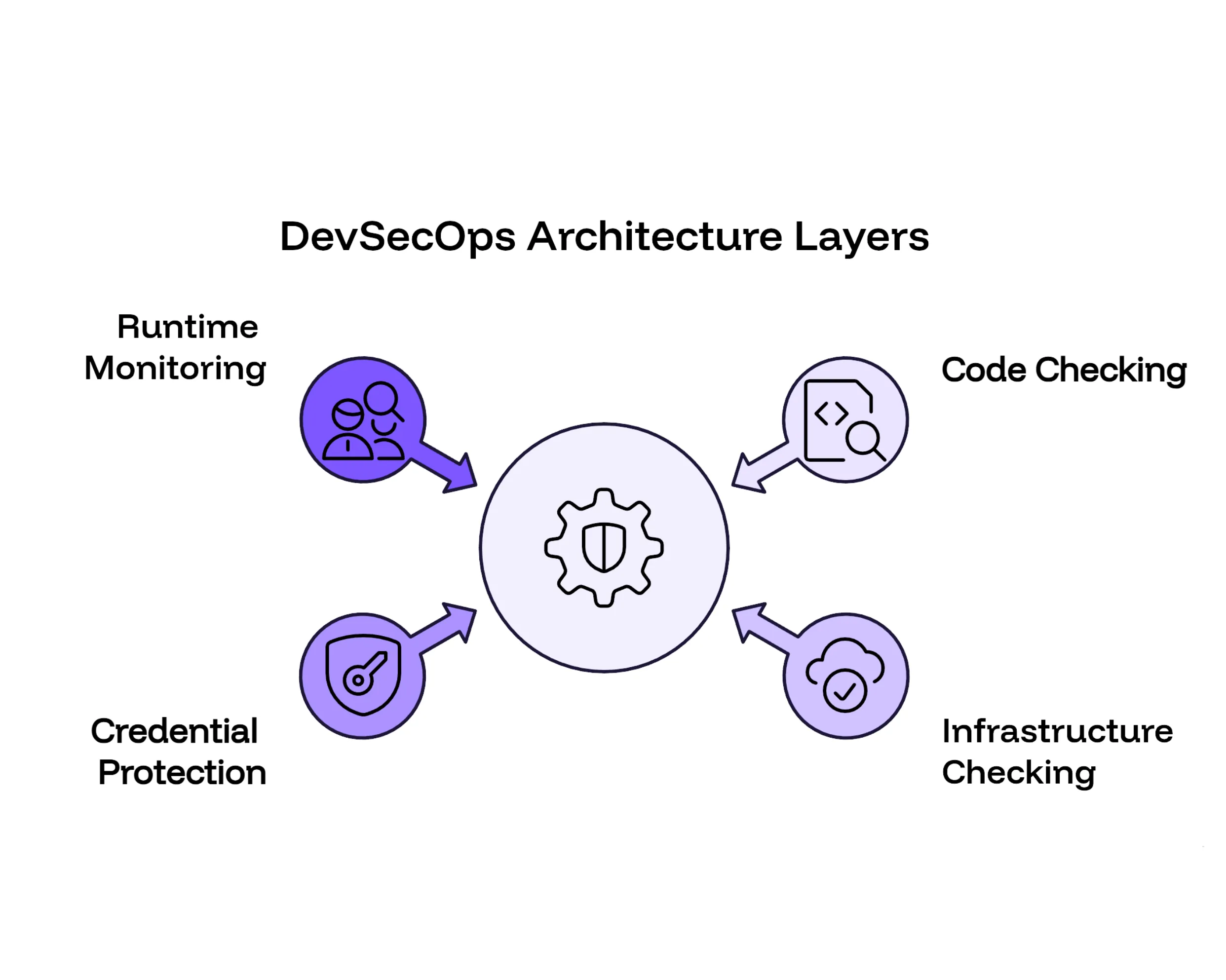
The Four Layers of a Real DevSecOps Architecture
Every vendor will describe this differently. Underneath the different names, there are four layers. Here’s what each one actually does, in your team’s language, not the vendor’s.
Layer 1 — Checking Your Code and the Libraries It Depends On
- What it catches: Known security holes in your code and in the third-party code you’re using (and almost every app uses a lot of third-party code)
- Common tools: Semgrep, Trivy, Grype
- Time to add: 1–2 days, if you already have a working build pipeline
Layer 2 — Checking Your Infrastructure Before It Goes Live
- What it catches: Misconfigured cloud settings and server setups, the kind of mistake that leaves a database open to the internet by accident
- Common tools: Checkov, OPA/Gatekeeper, Kyverno
- Time to add: 1 week for the basics, 3–4 weeks if you want rules built around how your company actually operates
Layer 3 — Protecting Your Passwords and Access Keys
- What it catches: Credentials (API keys, database passwords) sitting somewhere they shouldn’t, in code, in chat logs, in a spreadsheet someone shared once and forgot about
- Common tools: OpenBao, Sealed Secrets, Infisical
- Time to add: 1–2 weeks, depending on how many services need to be moved over
Layer 4 — Watching What’s Actually Running
- What it catches: Unusual activity happening right now, in your live product, the kind of thing that tells you someone got in before they’ve done real damage
- Common tools: Falco, Grafana, Prometheus
- Time to add: 2–3 weeks for basic visibility, 6–8 weeks if you want alerts tuned so your team doesn’t ignore them.
None of these four layers work well in isolation. A company that buys Layer 1 and stops there has bought a scanner, not a security program.
Where Most Teams Get This Wrong
I’ve watched teams spend real budget on this and still end up exposed. It’s almost always one of these:
- They buy the tool but never connect it to the pipeline. It sits there. Someone runs it manually once a quarter. That’s an audit, not DevSecOps.
- They only add checks at the very end. By the time a developer finds out something’s wrong, they’ve already moved on to the next task. Now it’s a context switch and a delay, not a quick fix.
- They skip secrets management entirely. Passwords and keys end up sitting in environment variables, or worse, committed straight into the code history, which stays there, findable, long after anyone remembers it happened.
- They turn on every alert with no priority levels. Engineers get flooded with notifications. After the tenth false alarm, they stop reading any of them, including the real one.
Each of these mistakes has the same root cause: buying a tool instead of building a workflow. If you want to see where your current deployment workflows have security and operational gaps, take our free Platform Engineering Maturity Assessment.
What Changes for Your Team, Day to Day
Before: A developer opens a pull request. It sits in a queue. Five days later, someone from security reviews it and flags a problem. By then, the developer is three tasks ahead and has to stop, remember the context, and go back.
After: A developer opens a pull request. Automated checks run in about 90 seconds. If there’s a vulnerability, it shows up right there, in the same screen, before the code is merged. The developer fixes it on the spot. Your security team isn’t buried in 50 tickets a day; they get one clear summary a week, covering what actually needs their attention.
That’s the entire business case. Faster fixes, fewer delays, and a security team that spends time on real problems instead of chasing paperwork. See how we used this automated approach to secure 7,000+ releases a year in our GitOps Transformation Case Study for a Hospital Management System.
What This Costs You in Time, Realistically
You do not need to hire a dedicated security engineering team to get here. Most of what’s described above can be added to a CI/CD pipeline you already have, in 4 to 6 weeks.
The right starting point depends entirely on what you already have in place; some companies need all four layers, others already have two working and just need the other two connected properly. Contact us today to figure out your starting line and get these automated guardrails running within a single sprint.
Frequently Asked Question
Get quick answers to common queries. Explore our FAQs for helpful insights and solutions.
It's a way of building software where security checks run automatically at every step - when code is written, when it's reviewed, when it's deployed, and while it's running, instead of one big review at the end.
Most companies can add the core pieces to an existing CI/CD pipeline in 4 to 6 weeks. Individual layers range from 1–2 days (code scanning) to 6–8 weeks (fully tuned runtime monitoring).
No. Most of this can be built on top of the engineering team and pipeline you already have. A dedicated hire helps at scale, but it isn't a requirement to get started.
Common tools include Semgrep, Trivy, and Snyk for code scanning; Checkov, OPA/Gatekeeper, and Kyverno for infrastructure checks; HashiCorp Vault and AWS Secrets Manager for credentials; and Falco, Grafana, and Prometheus for runtime monitoring.
Buying a security tool and never connecting it into the actual pipeline. It ends up used once a quarter as an audit, instead of running continuously the way it's meant to.
No. Any team running a regular deployment pipeline can add these layers. The scope and pace change with team size, but the approach applies from a 20-person engineering team up to several hundred.
DevOps focuses on speed and reliability of shipping software. DevSecOps adds automated, continuous security checks into that same pipeline, so security isn't a separate slow step at the end.
Written by
Hussain Gandhi
Hussain Gandhi is a DevOps Engineer at Improwised Technologies Pvt Ltd. He focuses on building scalable systems through automation and scripting. He has hands-on experience with cloud infrastructure, CI/CD pipelines, and infrastructure as code. Hussain combines strong technical skills with a collaborative work style. In his free time, he enjoys learning new things.
September 18, 2026
What Platform Engineering Services Actually Include
Chintan Viradiya
Author

September 16, 2026
What Actually Slows Kubernetes Down (And What to Fix Before Adding Nodes)
Hussain Gandhi
Author
September 10, 2026
What Off-Premise Migration Actually Involves (And What It Costs)
Chandan Teekinavar
Author

Optimize Your Cloud. Cut Costs. Accelerate Performance.
Struggling with slow deployments and rising cloud costs?
Our platform engineering solutions are built on open-source tools and use AI natively across the workflow.