
October 9, 2026
How to Patch an Air-Gapped Network

Hussain Gandhi
Author

Shyam Kapdi
Contributor

Shailesh Davara
Reviewer
An air-gapped system cannot pull updates, so every security patch has to be carried in on purpose. Patching an air-gapped network takes five steps: scan on the connected side, approve, transfer, verify on arrival, and roll out. Each step should leave a record. Below, we cover each step, the record it leaves, and where teams lose days. This article covers patching only. For build pipelines inside the gap, read our post on CI/CD in air-gapped environments.
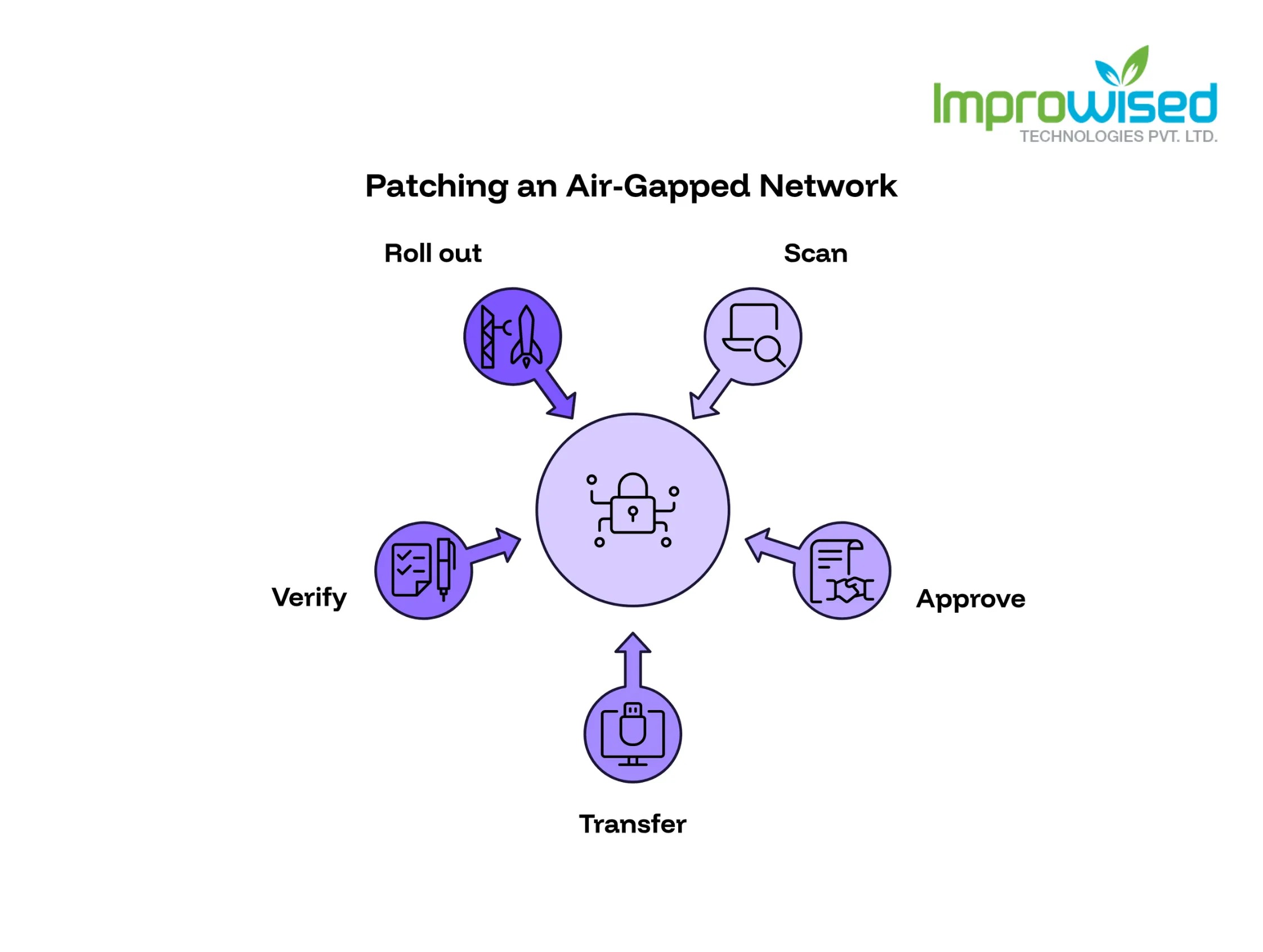
How to Patch an Air-Gapped Network in Five Steps
The gap sits between approval and transfer. Steps 1 and 2 happen on the connected side. Steps 3 to 5 happen at the gap and inside it.
Five-step patch flow for an air-gapped network. Scan and Approve sit on the connected side. A gap marker follows. Transfer, Verify, and Roll out follow inside the secure side.
- 1. Scan: Fetch the patch, record its hash, and check it for known vulnerabilities.
- 2. Approve: The security owner and the system owner both sign.
- 3. Transfer: Carry the files across on an approved host or media.
- 4. Verify: Check signatures and hashes, then import.
- 5. Roll out: Test, release in stages, keep the old version ready.
A patch is a delivery job with a signature at every handoff.
Why Patching Is the Hard Part of an Air Gap
Nothing arrives on its own. A patch exists inside the network only after someone carries it in. The risk sits in the time between the advisory and the install.
Three things stretch that time:
- An approval queue with no deadline
- A weekly transfer slot that a critical fix has to wait for
- A test environment that has to be rebuilt inside the gap
This is a process problem more than a tooling problem. Faster software does not fix a slow sign-off. To measure exactly where process bottlenecks are slowing down your infrastructure, take our free Platform Engineering Maturity Assessment.
Scan and Fetch on the Connected Side
A staging host outside the gap fetches the patch from the vendor repository. It records package names, versions, and hashes, then scans for known vulnerabilities. Any scanner your team already runs works. This article does not recommend one.
Example manifest, one line per package:
| name | version | sha256 | source | scan |
|---|---|---|---|---|
| example-lib | 2.4.1 | a3f1…9c0e | vendor-repo | pass |
| example-agent | 1.9.0 | 7be2…41d8 | vendor-repo | 1 medium, accepted |
The manifest is the list of what is allowed in. Anything not on it should not cross.
Approval: Who Signs and What They See
Two people sign: the security owner and the system owner. One checks the risk. The other checks the impact on the running system.
| Field | Why it exists |
|---|---|
| Patch ID | Ties the record to the files |
| Advisory ID | Shows which problem the patch fixes |
| Systems affected | Tells the system owner what to watch |
| Test result | Shows it was tried before approval |
| Approver | Names who accepted the risk |
| Date | Starts the clock for the audit trail |
Write the emergency path before you need it:
- Name who can approve a critical fix on their own.
- State what is skipped, such as waiting for the weekly transfer slot.
- State what is never skipped: hash checks, the scan on entry, and the log.
An emergency without a written path becomes an argument while the system stays exposed.
Move Files Across the Gap
Use an approved transfer host or approved media. Do not use personal drives.
- Send the checksum list by a different route than the files, where your rules allow it.
- Scan everything on entry.
- Log each transfer: who, what, when.
If files and checksums travel together, one tampered carrier can alter both.
Verify on Arrival
Check vendor signatures where they exist. Compare every hash to the manifest. Then import into the internal registry or package mirror.
- Block anything not in the manifest.
- Reject any file whose hash does not match.
- Keep the failed file and note the reason.
Registry setup is covered in CI/CD in air-gapped environments, so we do not repeat it here.
Nothing reaches a production machine unless it passes both checks.
Roll Out and Roll Back
Test inside the gap first. Release to a small group, then the rest. Write the rollback step before the rollout starts. See how we structured secure, automated rollouts with built-in rollbacks for a highly regulated environment in our GitOps Transformation Case Study.
Six-item rollout checklist:
- Patch tested on a copy of the target system
- Versions pinned in the internal mirror
- Previous version still available
- Rollback step written and tried
- Small group patched first, results checked
- Remaining systems patched, tracker updated
Some teams keep a Git repository inside the gap as the source of truth for what should be running. Any drift from it is then easy to see. Designing and building these secure, self-healing environments is a core part of our Platform Engineering Services.
A patch you cannot undo is a bigger risk than the one you are fixing.
Records an Auditor Asks For
Each audit question maps to one record.
- What changed? The manifest and the change record.
- Who approved it? The approval record.
- What came in? The transfer log.
- Did it work? The test and rollout log.
- How do we undo it? The rollback note.
Patch tracker columns to copy: Patch ID, Advisory ID, Systems affected, Scan result, Approver, Approval date, Transfer date, Verify result, Rollout group, Rollout date, Rollback note, Status.
If a record does not exist, the auditor treats the step as not done. If your team needs help designing an air-gapped patching process that satisfies auditors without bottlenecking your releases, contact our team today.
Frequently Asked Question
Get quick answers to common queries. Explore our FAQs for helpful insights and solutions.
Set a fixed window for routine patches and a written emergency path for critical ones.
Yes, after import, through the internal mirror and rollout tooling. Approval stays with a person.
It is the process of getting security updates onto a network with no internet connection by scanning, approving, carrying in, and verifying each patch by hand.
Use an approved transfer host or media, send checksums by a separate route where allowed, scan on entry, and log who moved what and when.
Written by
Hussain Gandhi
Hussain Gandhi is a DevOps Engineer at Improwised Technologies Pvt Ltd. He focuses on building scalable systems through automation and scripting. He has hands-on experience with cloud infrastructure, CI/CD pipelines, and infrastructure as code. Hussain combines strong technical skills with a collaborative work style. In his free time, he enjoys learning new things.


October 6, 2026
What a DevOps Consulting Partner Should Deliver in the First 90 Days
Chandan Teekinavar
Author


October 2, 2026
Kubernetes Backup Testing: Why Completed Doesn't Mean Recoverable
Khushi Joshi
Author



October 1, 2026
What Product Architecture Services Actually Cover
Chintan Viradiya
Author

Optimize Your Cloud. Cut Costs. Accelerate Performance.
Struggling with slow deployments and rising cloud costs?
Our platform engineering solutions are built on open-source tools and use AI natively across the workflow.