
October 1, 2026
What Product Architecture Services Actually Cover

Chintan Viradiya
Author

Shyam Kapdi
Contributor

Shailesh Davara
Reviewer
Product architecture services](https://www.improwised.com/services/infrastructure-and-architecture-review/) are a structured review of how your software is built: its parts, how they connect, and where it breaks when you change it. The output is a written answer to one question: rebuild, modernize, or leave it alone. Below is what gets reviewed, how we decide, and what you receive.
When Companies Request a Product Architecture Review
Most reviews start at one of three points:
- Before a rebuild decision. Someone proposes rewriting the system, and nobody has checked whether that is necessary.
- Before a scaling decision. Customers, traffic, or the team is about to double, and nobody knows if the system can take it.
- After years of growth. The system is now far bigger than its original design, and no one has reassessed it since.
Signs you are already late:
- Releases take longer every quarter
- One engineer is the only person who understands a key part of the system
- A small change breaks something unrelated
- New hires take months before they can ship anything
- The same outage keeps coming back
If you are seeing this specific pattern, read our article: What Production Incidents Reveal About Your System Maturity to understand why.
What a Software Architecture Assessment Covers
- System boundaries. What each part of the system owns, and where one part reaches into another part’s data.
- Technical debt hotspots. The files and modules that change most often and break most often. These cost you the most.
- Integration points. Payment providers, CRM, internal services, third-party APIs. We check what happens to your product when each one fails.
- Data. Where it is stored, who can write to it, and where the same data exists in two places.
- Deployment. How long a release takes, how often it fails, and how fast you can roll back. You can test your current deployment readiness right now with our free Platform Engineering Maturity Assessment.
- Security and support status. Frameworks, libraries, and vendors that are no longer supported.
- People. Which parts of the system only one or two people can maintain.
Legacy System Evaluation: Rebuild, Modernize, or Leave It Alone
This is the decision most buyers care about. Here is how we make it.
Five criteria:
- Cost of keeping vs. cost of replacing. Add up what the current system costs each year: maintenance work, outages, and features that take too long. Compare that to the full cost of a rebuild, including the months you run the old and new systems side by side. Teams usually count the first number too low and the second number too low as well.
- How much it still needs to change. A system that changes weekly and is painful to change needs work. A system that changes twice a year and runs fine does not.
- Whether the parts can be separated. If you can replace one part at a time without touching the rest, you do not need a full rebuild.
- Support status. If the language, framework, or vendor is end-of-life, you have a deadline.
- Who understands it. If nobody on your team can explain how a core part works, that is a risk on its own.
What we usually recommend:
| Outcome | When it fits |
|---|---|
| Leave it alone | Stable, rarely changed, no security exposure, cost to maintain is low |
| Modernize piece by piece | Most systems. Some parts cause most of the pain and can be replaced separately |
| Rebuild | Unsupported platform, data model that no longer matches how the business works, or parts so tangled they cannot be separated |
Our default is modernizing in stages. A full rebuild is the most expensive and slowest option, and it is rarely the right first answer. See how we successfully modernized and scaled a system without a ground-up rebuild in our case study: Optimizing a Lead Generation Platform with Multi-Region Resilience.
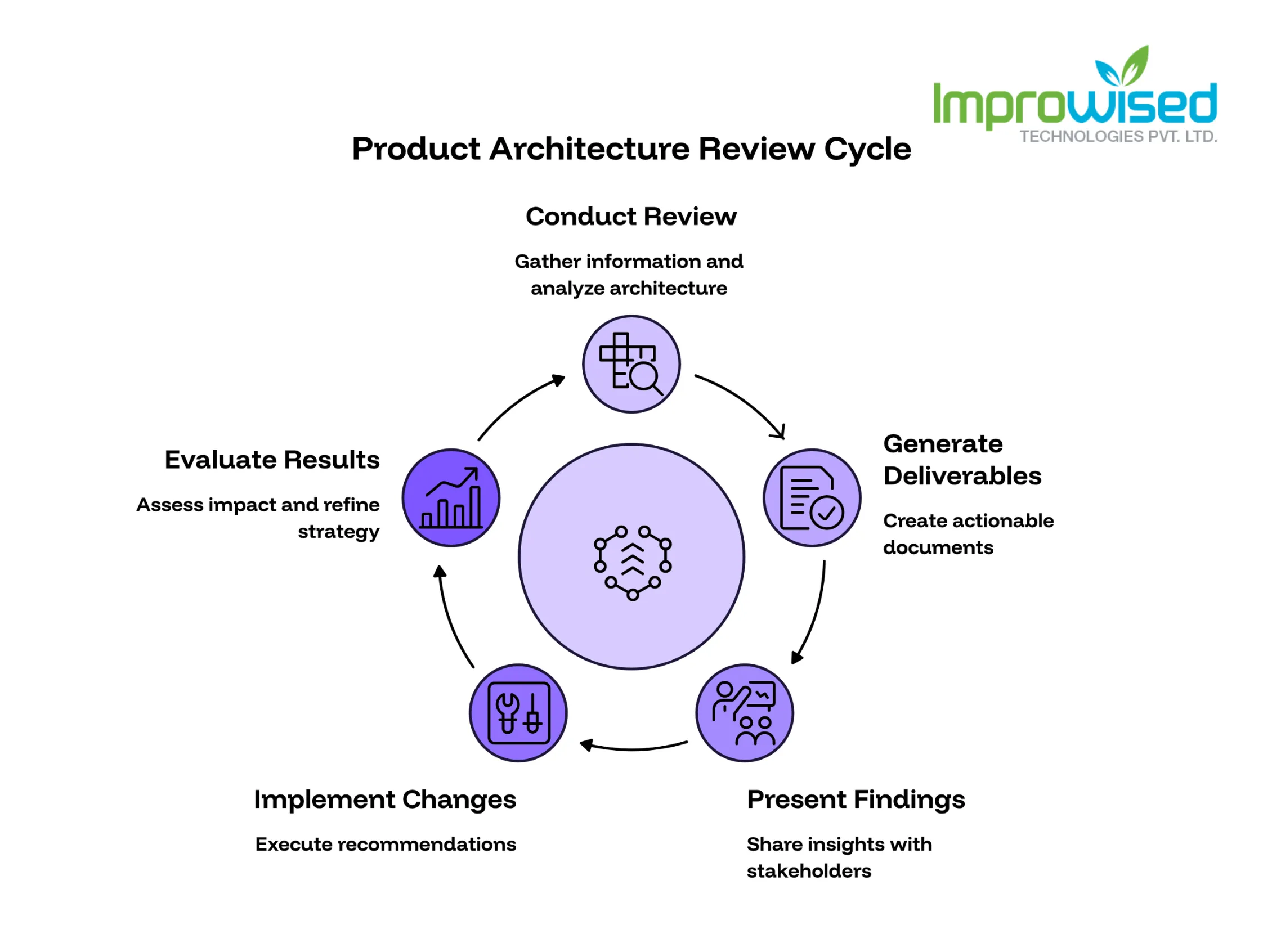
What You Get: Product Architecture Review Deliverables
You receive documents you can act on, not general advice:
- A system map. A one-page picture of the parts and how they connect.
- A prioritized list of architectural risks. Each risk is rated by impact, likelihood, and effort to fix.
- A modernization roadmap. What to change, in what order, and why that order.
- A build-vs-buy assessment for specific components. For example: keep your custom billing module, or replace it with a product you can buy.
- A cost comparison of rebuild, modernize, and leave-as-is for your system.
- A written answer to the rebuild question, with the reasoning behind it.
We walk your leadership and engineering team through the report in a review call.
How an Architecture Review Leads Into Custom Software Development
The review stands on its own. You can take the roadmap to your own team or another vendor.
If you want us to do the work, the roadmap becomes the scope for our Custom Software Development engagement. The order of work, the priorities, and the estimates are already written down. If the review says your system does not need work, we tell you that and stop there.
Send us your current system overview; we’ll tell you honestly if it needs a rebuild or not.
Frequently Asked Question
Get quick answers to common queries. Explore our FAQs for helpful insights and solutions.
It is a structured check of how your software is built, where it is fragile, and what it will cost to keep changing it. It ends with a written recommendation: rebuild, modernize, or leave it alone.
Start with a review. A rebuild is justified only when the platform is unsupported, the data model no longer fits the business, or the parts cannot be separated. Most systems do not meet that bar.
System boundaries, technical debt hotspots, integration points, data storage, deployment process, security and support status, and which parts depend on one or two people.
A rebuild replaces the whole system. Modernizing replaces or fixes one part at a time while the system keeps running. Modernizing costs less up front and carries less risk.
A system map, a prioritized list of risks, a modernization roadmap, build-vs-buy assessments for specific components, a cost comparison, and a written rebuild recommendation.
Before a rebuild decision, before a scaling decision, or when the system has grown well past its original design and releases keep slowing down.
No. The report and roadmap belong to you. You can use them with your own team or any other vendor.
Written by
Chintan Viradiya
Chintan Viradiya is a DevOps Engineer at Improwised Technologies. Passionate about Infrastructure as Code and CI/CD pipelines, he focuses on optimizing cloud deployments and enhancing the security and performance of modern applications. He plays a key role in ensuring high availability and driving DevOps best practices across projects

October 2, 2026
Kubernetes Backup Testing: Why Completed Doesn't Mean Recoverable
Khushi Joshi
Author



September 29, 2026
IaC Security Best Practices Before You Automate Everything
Hussain Gandhi
Author



September 23, 2026
How to Ship Faster Without Blowing the Platform Engineering Budget
Chandan Teekinavar
Author

Optimize Your Cloud. Cut Costs. Accelerate Performance.
Struggling with slow deployments and rising cloud costs?
Our platform engineering solutions are built on open-source tools and use AI natively across the workflow.