
November 4, 2026
AI Audit Logs: What to Record for Every AI Answer

Hussain Gandhi
Author

Shyam Kapdi
Contributor

Shailesh Davara
Reviewer
If someone asks why your AI gave a particular answer, you need a record to show them. The minimum record holds the prompt, the sources it drew on, the model and its version, the answer, the time, and who reviewed it. This article lists each field, explains how to store prompts safely, and shows what an auditor tends to ask. It is not legal advice.
The Minimum Record for One AI Answer
Every AI answer gets its own record. Think of it as a receipt. A receipt shows what was bought, when, and who approved it. An AI record shows what was asked, what the AI saw, what it said, and who checked it.
Each record holds these fields:
- Request ID: a unique number for this answer
- Timestamp: when the request and the answer happened
- User or service ID: who or what sent the request
- Model and version: which model answered
- Prompt template version: which instructions the model received
- Input: what the user asked
- Retrieved sources: the documents or data the AI pulled in
- Answer: what the AI returned
- Reviewer decision: who checked it and what they decided
If one of these is missing, there is a question you cannot answer later. A missing model version means you cannot say which model was responsible. Missing sources means you cannot say where a wrong fact came from.
Questions an Auditor Will Ask About Your AI
Auditors and regulators ask plain questions. They do not ask how your model works inside. They ask what happened in one specific case. Build the log so every question below has an answer you can pull up in minutes.
- What did the user ask? The input.
- What did the AI see? The prompt template and the retrieved sources.
- Which model answered? The model and version.
- Who checked it? The reviewer’s decision.
- When did this happen? The timestamp.
- Who sent the request? The user or service ID.
A good test: pick one answer from three months ago and try to answer all six questions. If you spend a day on it, or cannot do it at all, the log has a gap. Run this test before an auditor does.
Fields to Log per AI Answer
Here is each field, why it exists, and an example value. Fields marked sensitive need masking or tighter access.
Request ID: links every other field to one answer. Example: req_48213
Timestamp: places the answer in time, which matters when you compare it to a model change or a policy change. Example: 2026-10-14 09:42:11 UTC
User or service ID: shows who asked. Example: svc_support_bot (sensitive: can point to a person)
Model and version: shows which model produced the answer. Example: model-x, v2.3
Prompt template version: shows the exact instructions used. Example: refund_prompt@v14
Input: the user’s actual request. Example: “Can I get a refund for order 8841?” (sensitive: may hold personal data)
Retrieved sources: the documents the answer drew on. Example: refund_policy.pdf, section 3
Answer: the output the user saw. Example: “Refunds are available within 30 days.” (sensitive: may repeat personal data)
Reviewer decision: approved, rejected, or edited. Example: approved by j.lee
Token counts: how much text went in and out. As we break down in our guide, Stop Burning Cash on AI Tokens And Start Tracking What Matters, tokens are the unit most AI providers bill by, so this field ties each answer to its cost. Example: 412 in, 96 out
Latency: how long the answer took. Slow answers often point to oversized prompts or slow data lookups. Example: 1.8 seconds
Guardrail check results: which safety checks ran and whether they passed. Example: pii_filter: pass, toxicity: pass
Treat as sensitive: user ID, input, answer, and any retrieved source that holds private data.
How to Store AI Prompts Safely
Prompts often hold names, account numbers, contract terms, and private business details. Your log can end up holding more sensitive data than the system it records. Treat it that way. Engineering secure, encrypted boundaries around this data is a foundational part of our Autonomous AI Agent Services.
- Encrypt at rest. If someone steals the storage, the data should be unreadable.
- Limit reads by role. Most staff do not need raw prompts. Auditors and a small named group do. Give everyone else metadata only.
- Mask personal data before storage where the audit need allows it. Replace an email address with a token like
[EMAIL_1]. You keep the structure of the request without keeping the identity. - Keep a deletion path. When a person asks you to delete their data, you must be able to find every record that holds it. Index records by user so the search takes minutes, not weeks.
- Log who reads the logs. Access to the audit trail should leave its own record.
Track Model and Prompt Versions
You can’t explain an answer if you don’t know which model and instructions produced it. Models get upgraded, and prompts get edited. Without version records, an answer from March and an answer from October look the same, even though different systems produced them.
- Tag each prompt template in version control. Store the tag in every record. Then
refund_prompt@v14points to one exact piece of text. - Keep a change log of model upgrades. Write down the date, the old version, the new version, and who approved the switch.
- Never edit a live prompt without a new tag. A silent change breaks the link between old answers and their instructions. See how we engineered robust version control and deployment pipelines for AI infrastructure in our case study: Cloud-Native AI Orchestration Platform.
This also helps you debug. When answer quality drops, the version history shows what changed and when.
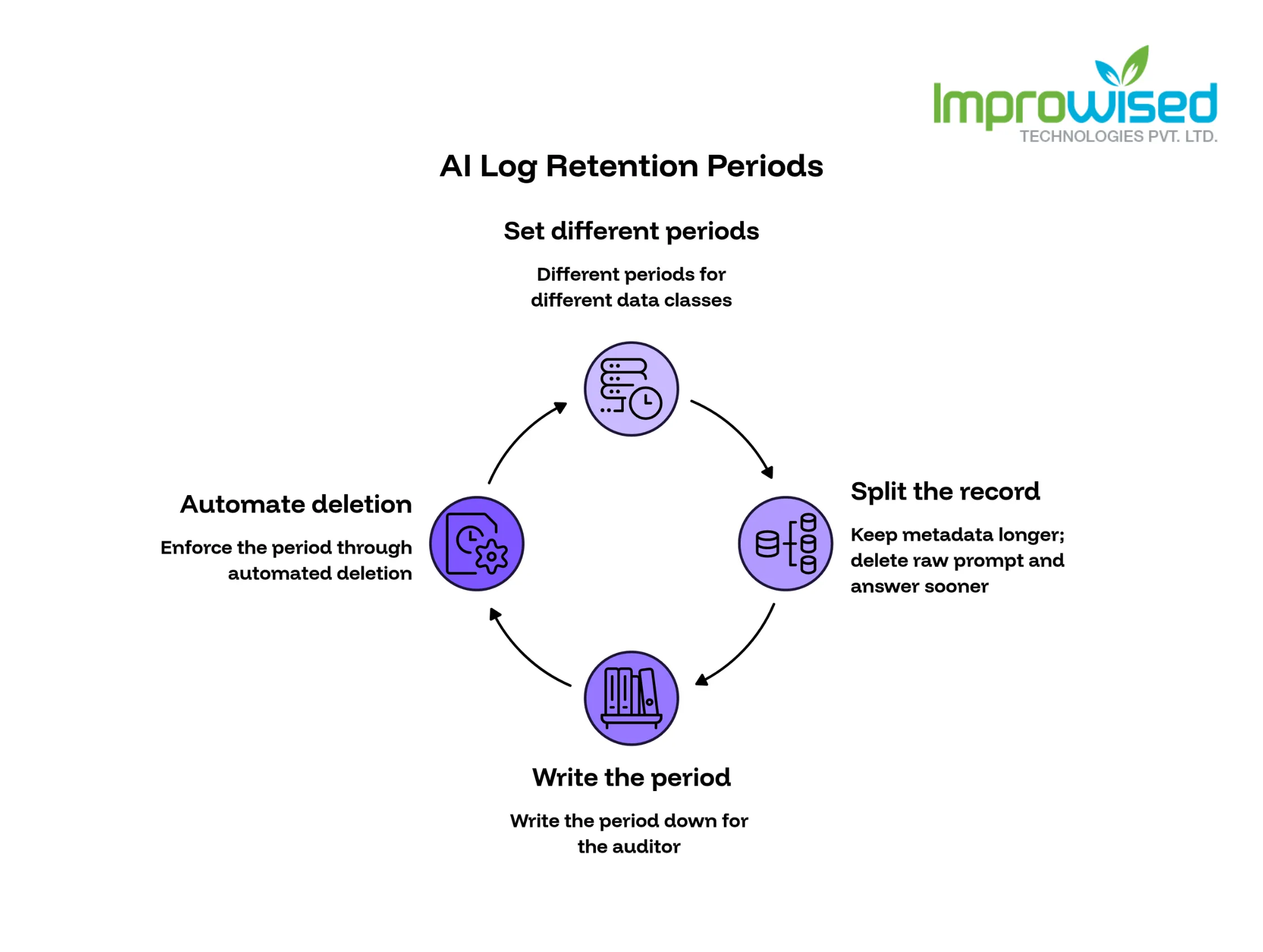
AI Log Retention Periods
Retention comes from your policy and your counsel. Do not state a number as law. Rules differ by industry, region, and data type.
- Set different periods for different data classes. Logs holding personal data may need a shorter period than logs holding only metadata.
- Split the record if needed. Keep metadata (ID, timestamp, model, version) longer. Delete the raw prompt and answer sooner.
- Write the period down. An auditor will ask for the written policy, not only the practice.
- Automate deletion. A period nobody enforces is not a period. If you are unsure if your infrastructure automation is mature enough to reliably enforce these policies, take our free Platform Engineering Maturity Assessment.
Reviewer Sign-Off Records
A human check only counts if you can prove it happened. This matters most where AI output affects customers, money, or legal terms. Record:
- Who reviewed: name or ID
- When: the time of the decision
- What they approved: the exact answer they saw
- What they changed: the original text and the edited text, side by side
A bare “approved” flag shows little. A reviewer who approves 500 answers in 10 minutes has not reviewed them. The change record and the review time show whether the check was real.
What AI Logging Costs
Storage cost follows one formula:
Records per day × average record size × retention days = total storage
- Example (illustrative): 100,000 records a day × 5 KB × 365 days = about 182 GB
Three things raise the number: long answers, long retrieved documents, and long retention periods. Splitting metadata from raw text lowers it, because you can delete the large fields early and keep the small ones.
If you need expert help designing an AI architecture that is secure, cost-effective, and fully auditable, contact our team today.
Frequently Asked Question
Get quick answers to common queries. Explore our FAQs for helpful insights and solutions.
Store it if you need to reproduce or explain an answer later. If the prompt holds personal data, mask it first or restrict who can read it. Storing the template version alone is not enough, because it leaves out what the user typed and what sources were pulled in.
Your policy and counsel decide. Set different periods for different data classes, and write the period down.
Guardrails block or flag bad output while the answer is being produced. Audit logs record what happened afterward, including which guardrail checks ran and whether they passed. You need both.
Request ID, timestamp, model and version, prompt template version, input, retrieved sources, answer, and reviewer decision.
Often yes. Mask personal data before storage where the audit needs allow it.
Written by
Hussain Gandhi
Hussain Gandhi is a DevOps Engineer at Improwised Technologies Pvt Ltd. He focuses on building scalable systems through automation and scripting. He has hands-on experience with cloud infrastructure, CI/CD pipelines, and infrastructure as code. Hussain combines strong technical skills with a collaborative work style. In his free time, he enjoys learning new things.
October 31, 2026
How Our Repos Got Infected with PolinRider, and How We Cleaned Them Up
Rakshit Menpara
Author



October 30, 2026
How to Upgrade Kubernetes in an Air-Gapped Network: 6 Steps and a Rollback Plan
Chandan Teekinavar
Author



October 27, 2026
AI Agent for Infrastructure Pull Request Review
Chintan Viradiya
Author

Optimize Your Cloud. Cut Costs. Accelerate Performance.
Struggling with slow deployments and rising cloud costs?
Our platform engineering solutions are built on open-source tools and use AI natively across the workflow.