
October 31, 2026
How Our Repos Got Infected with PolinRider, and How We Cleaned Them Up

Rakshit Menpara
Author

Ridham Parmar
Contributor
Last updated: 31 October 2026. We will update this post as we learn more.
On the morning of 29 October, our engineer Ridham Parmar opened GitHub and found that 99 branches across 9 repositories had been force-pushed from his account. The pushes happened between 00:33 and 00:49 that night, while he was asleep. Every commit had a familiar message, his name, and its original date.
The pushes came from PolinRider, a git worm that the OpenSourceMalware team attributes to North Korea and links to the “Contagious Interview” fake job-interview campaigns. By the time we noticed, it had been moving through our repositories for 28 days. This post covers how it got in, how it spread, how we cleaned it up in a day, and what to check if you think it has reached you. The scanner we built is open source: Improwised/polinrider-scanner.
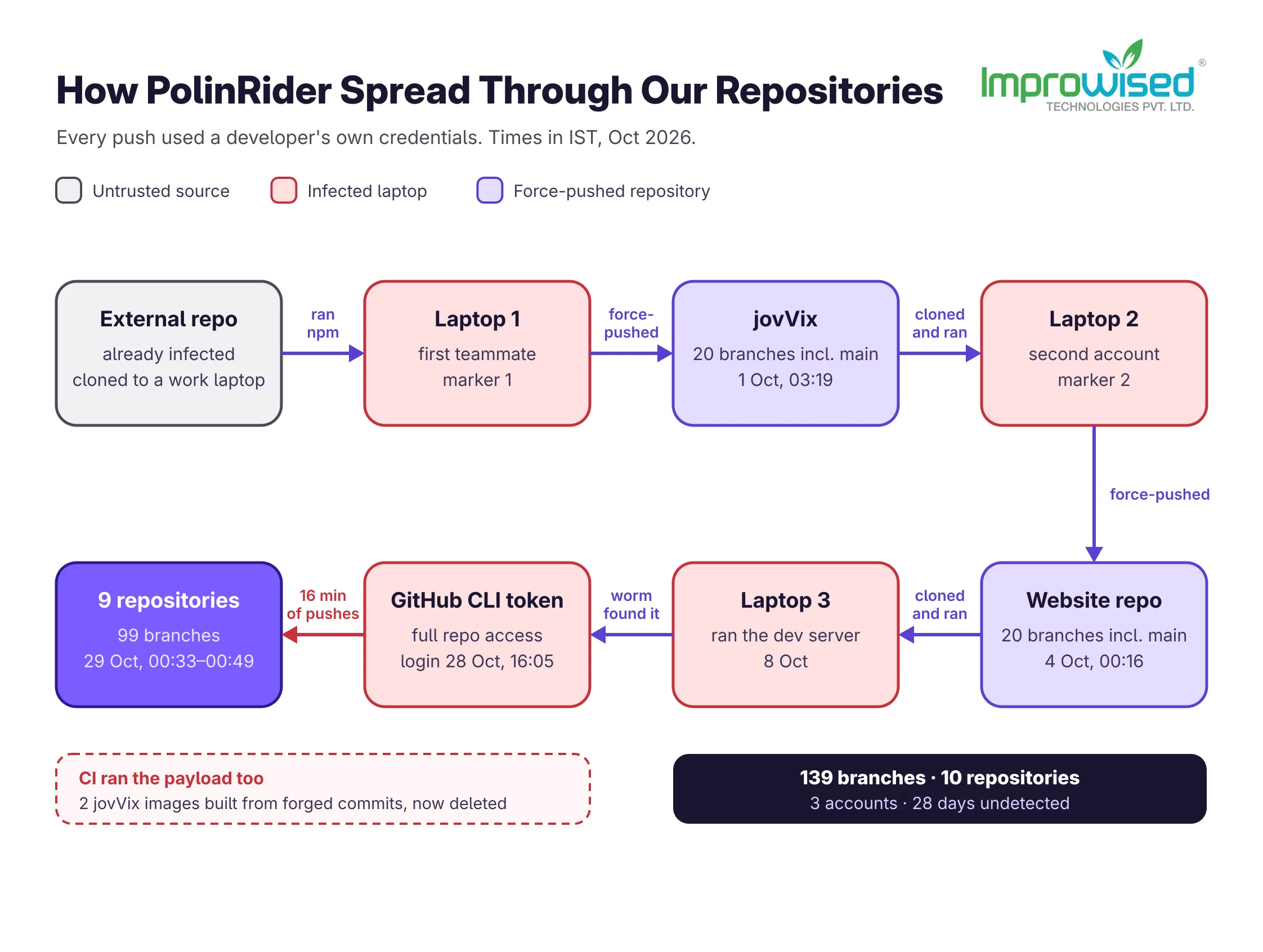
What Happened, in Order
It started with one teammate cloning an external repository and running it on a work laptop. That repository was infected. From there the worm used each developer’s own credentials to infect every repository they could push to, and each infected repository infected the next person who ran it.
| Date (IST) | What happened |
|---|---|
| 1 Oct, 03:19 | First forced push: 20 branches of jovVix, our open-source quiz app, from the first teammate’s account, including main |
| 4 Oct, 00:16 | A second account force-pushes 20 branches of our own website repository, including main |
| 4 Oct, 01:59 | An outside researcher reports the payload in a public jovVix issue, because our security mailbox did not accept the email |
| 4 Oct, 17:32 | The same researcher opens a pull request to remove it. It is closed without merging |
| 8 Oct, 10:03 | A third developer clones the website repository and runs its dev server. The worm installs itself on the laptop |
| 13 Oct, 12:21 | A dependency-upgrade pull request also removes the payload from jovVix main. The other infected branches stay |
| 28 Oct, 16:05 | A GitHub CLI login puts a token with full repository access on that laptop |
| 29 Oct, 00:33–00:49 | The worm uses that token to force-push 99 branches in 9 repositories |
| 29 Oct, ~10:15 | Ridham notices. Investigation starts |
| 29 Oct, 19:00 | All 20 developer machines scanned, all GitHub branches restored |
In total, 139 branches in 10 repositories were force-pushed from 3 developer accounts. Most were internal repositories. A few client repositories that one developer had push access to were force-pushed too. We restored them the same day and, as far as we can tell, no customer system or data was affected. Our Forgejo server was not touched.
How the PolinRider Worm Works
Forged commits look like yours. The worm amends the newest commit on every branch it can push to and force-pushes the result. It keeps the commit message, the author and the date. In git log, a forged commit looks exactly like the one it replaced.
The payload sits off-screen. The loader is obfuscated JavaScript appended to the end of an existing line, after hundreds of spaces. In an editor or a diff view, the line looks normal unless you scroll far to the right. It targets files that run on npm install, dev, build or test: svelte.config.js, postcss.config.js, nuxt.config.ts, next.config.js, server.ts, and scripts.
The command server address lives on a blockchain. In our samples, the loader reads the address of its command server from Ethereum and BNB Smart Chain transactions, through public RPC services. There is no domain to block in advance.
npm becomes the carrier. On the third developer’s laptop, the loader injected itself into npm’s own lib/cli.js. From then on, every npm or npx command restarted it, including a tool that started automatically. That is why our first instruction to the team was to stop running npm entirely.
Each infection leaves a marker. The loader sets a global variable with an ID, in the form global.o='N-NNNN-du'. The numbers differ between infected machines, and in our case each marker matched exactly one pushing account. The detached node -e process that our variants start sets global.i. The OpenSourceMalware dossier documents a newer variant that sets global['_V'] instead, with tags in the form 8-stN.
Signs Your Repository Is Infected
- Branches force-pushed that nobody pushed, often many at once, keeping their old messages and dates.
- A config line that ends in a long run of spaces followed by code. Search for code after 150 or more spaces at the end of a line.
- A “Merge pull request” commit with only one parent. The worm drops the second parent when it rewrites a merge. GitHub squash merges can also produce single-parent merges, so check the files before you panic.
- CI runs failing after forced pushes you do not recognise.
- A detached
node -eprocess that keeps running after an npm command has finished.
Commit dates prove nothing here. The worm keeps the original dates, so “recent commits” will not show it. Use the server’s push time instead: GitHub’s activity log and force-push events.
How We Scanned 20 Developer Machines in a Day
At 13:06 on 29 October we published a read-only scanner, polinrider-scanner, and asked every developer to run it and report back in a team thread. It checks:
- every text file in the developer’s home directory
- every branch, tag and stash of every git repository on the machine
- running processes and network connections to the known command servers
- shell startup files, cron, systemd, autostart entries and editor extensions
- which credentials are stored on the machine, so you know what to rotate
It never runs code from what it scans and never prints secrets. Run it as each developer, without sudo:
git clone https://github.com/Improwised/polinrider-scanner.git
cd polinrider-scanner
./scan.sh
By 19:00, 20 developers had reported. Five machines had the worm. Most other warnings were legitimate hook setups (Husky, Hermes, Frappe) that the scanner flags because hooks can run code.
For the infected machines we followed one rule: don’t clean them in place. We disconnected them, rotated every credential they held from a different, clean machine, scanned them in full to find every repository they had touched, and reimaged all five.
How We Restored the Branches
Deleting the line and pushing again leaves the forged commit where your real one used to be. Every infected branch needs fixing, not just main.
Our script uses GitHub’s force-push activity log to find the commit each branch pointed to before the forced push. It checks that commit is clean and moves the branch back to it. Every push uses --force-with-lease against the infected commit, so a branch that someone changed in the meantime is skipped rather than overwritten. Where no clean original exists, it adds a cleanup commit instead.
Ridham verified every restore by hand before it was pushed. To push the restores, we had to allow admin force-pushes on protected branches for a few minutes. We switched protection back on as soon as we were done.
Your CI and Static Site Builds Run the Payload Too
The payload lives in config files that your build loads, so every CI run and every static site build of an infected commit runs the worm, on the build machine.
It happened to us twice:
- jovVix: CI built and pushed two container images from forged commits. One contains the worm’s remote-control kit. It never ran in our cluster, because that container only runs nginx and serves static files, but we treated both images as compromised and deleted them from Docker Hub. The jovVix security advisory lists the affected commits, image tags and digests.
- Our website: every build since 4 October loaded the infected
svelte.config.js. The payload targets the build machine and is not designed to end up in the pages, and our check of the live site found none. Our email credentials live in Cloudflare Workers as runtime secrets, not in the build environment, so they were most likely never exposed.
If your builds ran an infected commit, rotate every secret available at build time: registry passwords, deploy keys, API tokens in CI variables. Rebuild every image and deployment from a clean commit. If you are not sure which secrets your builds can see, start with how to manage sensitive infrastructure data.
The Signals We Missed for 28 Days
The worm was in our repositories from 1 October. We found it on 29 October. Looking back, we had three earlier chances:
- 4 October, 01:59: an outside researcher, @Affapple, tried to email our security address. The mailbox did not accept it, so they opened a public issue instead. It named the commit, what the payload did, the command server and the marker. That is most of what we pieced together on 29 October, handed to us 25 days earlier. The mailbox now works.
- 4 October, 17:32: they opened a pull request titled “Remove injected malware code” and asked us to fix every branch. It was closed without merging.
- 13 October: a dependency-upgrade pull request removed the payload from jovVix
main. The fix was right, but it stopped at one branch and one file. Nobody asked how the code got there, which account pushed it, or which other branches had it.
The 13 October fix bought us 16 days. If you find injected code, treat it as an incident, not a bug: find the account that pushed it, then find everywhere else that account could push. It is the same gap we described in why post-mortem action items don’t ship.
What We Are Changing
These are the changes we are rolling out next. We will update this post as each one lands.
- Block force-pushes on default and release branches across our GitHub organisation, as part of tighter access control and audit trails for our Git repositories.
- Alert on force-push events from the GitHub audit log, so a mass push pages someone that night.
- Require signed commits on protected branches.
- Schedule scans of developer machines and of the organisation’s repositories.
- Run untrusted code in a disposable VM, never on a work machine. That includes take-home tests and “just have a look at this repo” requests. Switch off VS Code automatic tasks.
- Use short-lived, fine-grained tokens instead of long-lived tokens and SSH keys with push access to everything. Least privilege applies to developer credentials as much as to services.
- Treat every security report as an incident, whichever channel it arrives through, including a public issue.
Most of this is ordinary CI/CD and access hygiene. If your pipeline security needs work, see how DevSecOps fixes CI/CD security.
Security Posture Is What Shortens Day 28
One cloned repository on one work laptop reached 10 repositories and 3 accounts, and stayed hidden for four weeks. What would have stopped it, or caught it on day one, is the boring part: protected branches, scoped tokens, alerts on unusual pushes, and a rule about where untrusted code runs. Those are architecture decisions made before any tool enters the picture, and we did not have them in place.
In Rakshit’s words: “This highlights importance of strong security posture and compliance to ensure these events are avoided or detected very fast.”
Frequently Asked Question
Get quick answers to common queries. Explore our FAQs for helpful insights and solutions.
Look for branches force-pushed that nobody pushed, and for config files (postcss.config.js, next.config.js, svelte.config.js, nuxt.config.ts) with code after a long run of spaces at the end of a line. Run our open-source scanner, Improwised/polinrider-scanner on GitHub, on every machine that has the repository.
No. The account that pushed it still has its credentials stolen, the machine that ran it is still infected, and every other branch it touched still carries the payload. Rotate credentials from a clean machine, reimage the infected machine, and restore every affected branch.
Yes. The worm modifies npm itself and installs a remote-control kit. Cleaning it in place means trusting that you found every piece. Reimaging is faster and does not depend on that.
Use GitHub's activity log for the repository, which records force-push events with the account that made them. The marker in the payload also maps to one infected machine.
CI builds run the payload, because the build loads the infected config file. Treat every secret available at build time as exposed, and rebuild images from a clean commit.
Written by
Rakshit Menpara
Rakshit Menpara is the CTO and Co-Founder at Improwised Technologies. With deep expertise in cloud-native systems, DevOps, and Kubernetes, he leads the technology vision and architecture across all engineering initiatives. Rakshit drives innovation at the intersection of infrastructure, automation, and scalability.







Optimize Your Cloud. Cut Costs. Accelerate Performance.
Struggling with slow deployments and rising cloud costs?
Our platform engineering solutions are built on open-source tools and use AI natively across the workflow.