
October 30, 2026
How to Upgrade Kubernetes in an Air-Gapped Network: 6 Steps and a Rollback Plan

Chandan Teekinavar
Author

Shyam Kapdi
Contributor

Shailesh Davara
Reviewer
Upgrading Kubernetes inside an air-gapped network means carrying in more than one patch. The new version needs its own container images, node packages, and add-ons, plus checks for removed APIs. This article lists what to collect on the connected side, how to move and verify it, the order to upgrade in, and how to roll back with an etcd snapshot.
On a connected cluster, an upgrade pulls what it needs as it goes. In an air-gapped cluster, nothing can be pulled. Whatever you forgot to bring in stays missing until you stop, go back to the connected side, and start another transfer. That is why most failed air-gapped upgrades fail on preparation, not on the upgrade itself.
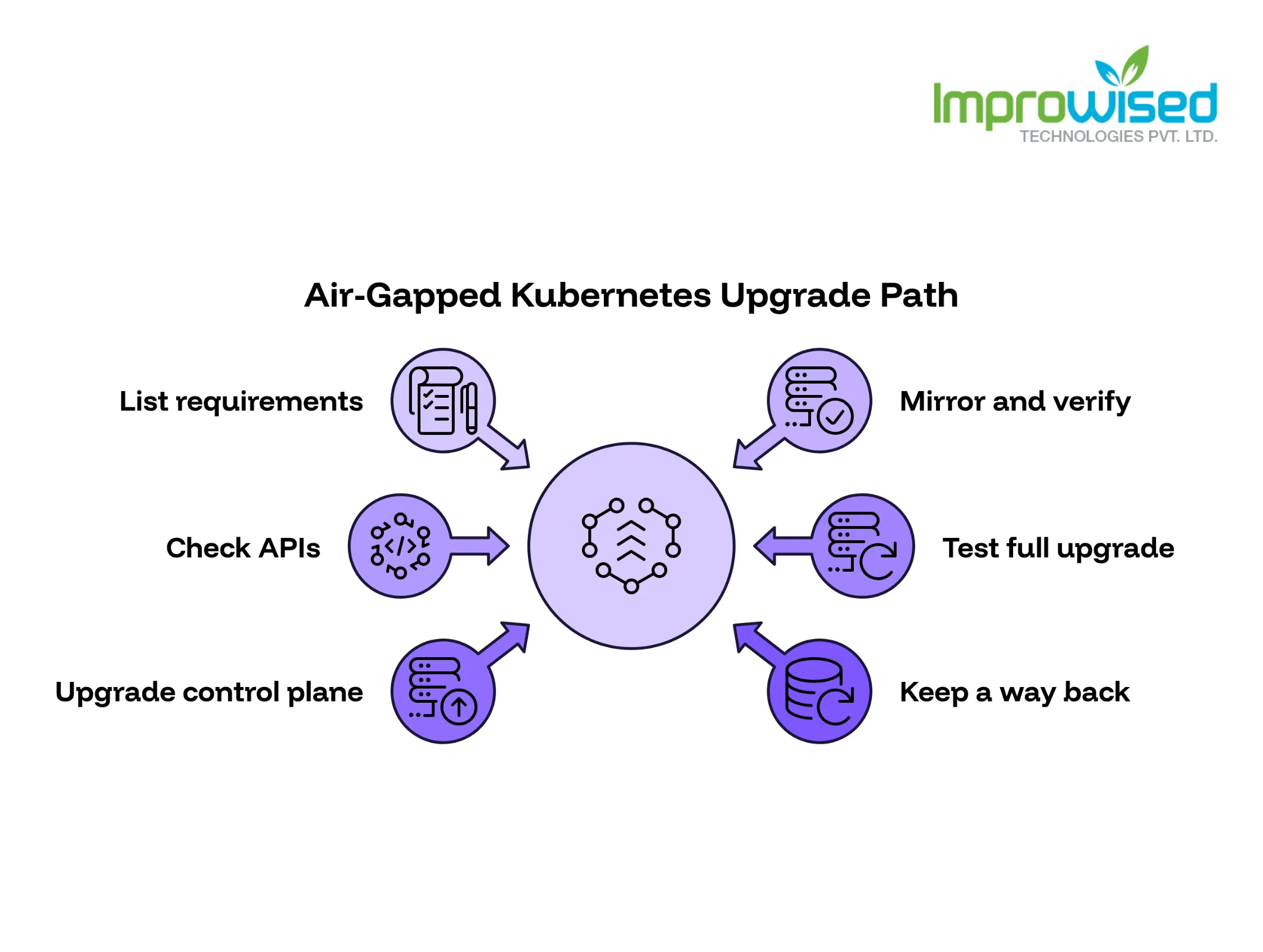
The Air-Gapped Kubernetes Upgrade Path in Six Steps
- List everything the new version needs.
- Mirror it into your internal registry and package repository, and verify it.
- Check your manifests and charts for removed APIs.
- Test the full upgrade on a copy of the cluster.
- Upgrade the control plane first, then the nodes one at a time.
- Keep a way back with an etcd snapshot you have already tested.
Why a Kubernetes Upgrade Is Bigger Than a Patch
A patch replaces a package. A cluster upgrade changes four things at once:
- The control plane: the part that decides what runs where
- The node software: the kubelet and container runtime on every machine
- The add-ons: networking, ingress, storage and monitoring
- Which APIs exist: new versions remove old APIs, and anything still using them breaks
Each of these has its own files, its own risks, and its own tests. A kernel patch on one node does not touch the other three.
Upgrade one minor version at a time. Going from 1.29 to 1.31 means two complete upgrades, each with its own images, packages, and testing. You cannot jump straight to 1.31. The kubelet on a node may also be older than the API server, but only within a limited range, and it can never be newer. Check the version skew rules in the upstream Kubernetes documentation for the exact versions you plan to run.
Plan for the transfer cost. In an air-gapped site, every extra minor version means another round of transfer, scanning, and approval. If you are two versions behind, you will do that twice. Add this to your schedule before you commit to a date.
List Everything the New Version Needs
Build this list on the connected side, from a dry run, not from memory. People forget the pause image, and without it, pods cannot start.
For kubeadm clusters, kubeadm config images list with your target version prints the control plane images. For add-ons, read the image references from your Helm charts and manifests.
What goes on the list:
- Control plane images: API server, controller manager, scheduler, kube-proxy, CoreDNS, etcd, and the pause image
- Add-on images and charts: network plugin, ingress controller, storage driver, monitoring agents, and any admission or policy tools
- Node packages: kubelet, kubeadm, kubectl, and the container runtime, built for your exact OS and version
- Tools you run during the upgrade: etcdctl or etcdutl, and your removed-API scanner
Save the result as a plain text file, one line per item, with its version and digest:
registry.k8s.io/kube-apiserver:v1.XX.X   sha256:<digest>
registry.k8s.io/etcd:3.X.X               sha256:<digest>
registry.k8s.io/pause:3.X                sha256:<digest>
kubelet 1.XX.X-XX                        sha256:<checksum>
Treat this file as the contract. For the exact protocol on safely moving these files, read our guide: How to Patch an Air-Gapped Network in Five Steps. Everything that crosses the gap must match a line in it. Anything not on the list does not cross. This keeps your security team’s review short and gives you something to check against when a node cannot find an image at 2 a.m.
Common misses:
- The pause image
- Images that only run during the upgrade, such as kube-proxy updates
- Node packages built for a different OS release than your nodes use
- Add-on versions that match the new Kubernetes version
Mirror and Verify Before the Upgrade Starts
Moving files across is not enough. You have to prove they arrived unchanged.
- Push every image into the internal registry.
- Compare each digest against the list. A mismatch means stop. Do not continue and hope.
- Host node packages in an internal repository your nodes can reach. Test one install on a spare node.
- Point the cluster at the internal registry before the upgrade begins. If a node still looks for the public registry, it fails with nowhere to fetch from.
- Check image pull on a node. Pull one new image from the internal registry on a real node. This catches certificate and credential problems early.
For kubeadm, set the image repository to your internal registry in the cluster configuration so every control plane image resolves there.
Do this at least a few days before the upgrade window. If the check fails, you want time to fix it without pressure.
Check for Removed APIs Before You Start
Every Kubernetes release can remove APIs that were deprecated earlier. If a manifest or Helm chart still uses a removed API, applying it fails.
Do this on the old version, before anything is upgraded:
- Scan all manifests and charts for APIs the target version removes. Pluto and Kubent are common tools for this.
- Scan what is running, not only what is in Git. Old objects created by hand or by old pipelines may not exist in your repository.
- Fix each finding and redeploy while the cluster is still healthy.
- Re-scan until the result is clean.
- Check third-party charts too. Add-ons you did not write can still use removed APIs.
Why this comes first: a removed API fails at apply time. Managing this exact kind of lifecycle risk and automation is a core part of our Platform Engineering Services. If you discover it after the control plane is upgraded, you are fixing a broken deployment in the middle of a change window, on a half-upgraded cluster, with a clock running.
Test on a Copy First
Build a staging cluster inside the gap. It needs:
- The same Kubernetes version as production
- The same add-ons at the same versions
- The same OS image and container runtime as the production nodes
- A sample of real workloads, not only test pods
Run the full upgrade there, using the same files, the same registry, and the same commands you will use in production. If the staging run needs a step that production does not, your plan is wrong.
Then write down two things:
- What the test proved: the upgrade completes, workloads restart, add-ons still work, the rollback restores
- What it could not prove: production load, production data volume, traffic patterns, and anything that only happens at scale
The second list matters more. It tells your team where to watch closely during the real upgrade, and it gives your managers an honest answer to “is this safe?”
Upgrade the Control Plane, Then the Nodes
Control plane first. Nodes cannot run a newer version than the control plane they report to.
On a kubeadm cluster, run the upgrade plan on the first control plane node, apply the upgrade, then upgrade the remaining control plane nodes one by one. Update the kubelet on each control plane node when its turn comes.
Then the worker nodes, one at a time:
- Drain the node, so workloads move off it
- Upgrade the kubeadm, kubelet, and runtime packages
- Uncordon the node so it accepts workloads again
- Check it using the list below
- Move on to the next node
Keep spare capacity. If you drain a node and the remaining nodes are full, workloads sit in Pending. Check your headroom before you start. See how we engineered zero-downtime deployments and upgrades for a highly regulated environment in our GitOps Transformation Case Study. Also look at pod disruption budgets, which can block a drain when too few replicas are available.
Check after each node:
- Node shows Ready
- Kubelet reports the new version
- System pods on that node are Running
- Workloads moved back and pass health checks
- No new errors in kubelet and runtime logs
If a node fails any check, stop. Do not upgrade the next one. One broken node is a small problem. Five broken nodes is an outage.
After the last node: confirm all nodes show the same version, run a test deployment, check the add-ons one by one, and confirm monitoring and logging still receive data.
Roll Back with an etcd Snapshot
etcd holds the state of the whole cluster. Take a snapshot before the control plane changes, and store it outside the cluster. A snapshot kept on the node you are upgrading is lost if that node fails.
What a rollback can undo:
- Cluster state, restored to the moment of the snapshot
- Changes the upgrade made to control plane objects
What it cannot undo:
- Anything created or changed after the snapshot. It is lost on restore.
- Objects already written in a newer format by the upgraded control plane. Confirm this against the upstream documentation for your versions.
- Changes on the nodes themselves, such as upgraded kubelet and runtime packages. You need the old packages in your internal repository to reinstall them.
Keep the old version’s files. Do not delete the previous images and packages from your registry until the upgrade is signed off. Rolling back needs them.
One rule: a snapshot you have never restored is not a rollback plan. Restore it on the staging cluster first and confirm the cluster comes up healthy. Many teams discover during an outage that their backup job reported “completed,” but the restore does not work. If your team struggles to validate disaster recovery and rollbacks, take our free Platform Engineering Maturity Assessment to identify your operational blind spots.
If you need expert help planning and executing a secure, zero-downtime Kubernetes upgrade, contact our team today.
Frequently Asked Question
Get quick answers to common queries. Explore our FAQs for helpful insights and solutions.
Yes. Collect the images, node packages, and add-ons on a connected machine, move them across with verification, and upgrade from your internal registry and repository. The upgrade steps are the same as on a connected cluster. Only the source of the files changes.
Build the image list from a dry run on the connected side. Pull each image, record its digest, transfer the files, and push them into your internal registry. Compare every digest against the list. Then point the cluster at the internal registry before you upgrade.
Kubernetes supports each minor version for a limited time, roughly a year and then some, so check the upstream support window. Plan at least one minor upgrade per year. Don’t let the gap grow, because every skipped version becomes another upgrade you owe, and more APIs are removed along the way.
Yes. Network plugins, ingress controllers, and storage drivers each support specific Kubernetes versions. Check each one against your target version and add the new images and charts to your list.
Deployments fail at apply time, usually in the middle of the upgrade. You then fix manifests on a half-upgraded cluster, with less room to recover.
No. Upgrade one minor version at a time. Skipping is not supported, and each step has its own images, packages, and removed APIs.
Partly. An etcd snapshot restores cluster state to the time it was taken, and you reinstall the old node packages. Changes made after the snapshot are lost, and a restore has to be tested before you rely on it.
Written by
Chandan Teekinavar
Chandan Teekinavar is a DevOps Engineer at Improwised Technologies. Passionate about Infrastructure as Code and CI/CD pipelines, he focuses on optimizing cloud deployments and enhancing the security and performance of modern applications. He plays a key role in ensuring high availability and driving DevOps best practices across projects



Optimize Your Cloud. Cut Costs. Accelerate Performance.
Struggling with slow deployments and rising cloud costs?
Our platform engineering solutions are built on open-source tools and use AI natively across the workflow.