
October 22, 2026
Connect an AI Model to Your Database and APIs

Hussain Gandhi
Author

Shyam Kapdi
Contributor

Shailesh Davara
Reviewer
Connecting an AI Model to Your Own Database and APIs Without Sending Raw Data Out
There are three ways to connect an AI model to your data: let it call your own API, give it a search index, or copy a subset of data to it. The safest default is read-only access through your own API, because your code decides what the model can see.
If you are comparing AI app generation tools with internal databases and APIs, ask one question before anything else: who controls the data the model receives, your code or the tool? If the answer is the tool, you have given up the one control that matters most.
This article compares the three options, shows how to limit what leaves your systems, and lists the tests to run before release. It is written for teams adding AI to a product that already has customers, real data, and real rules about who can see what.
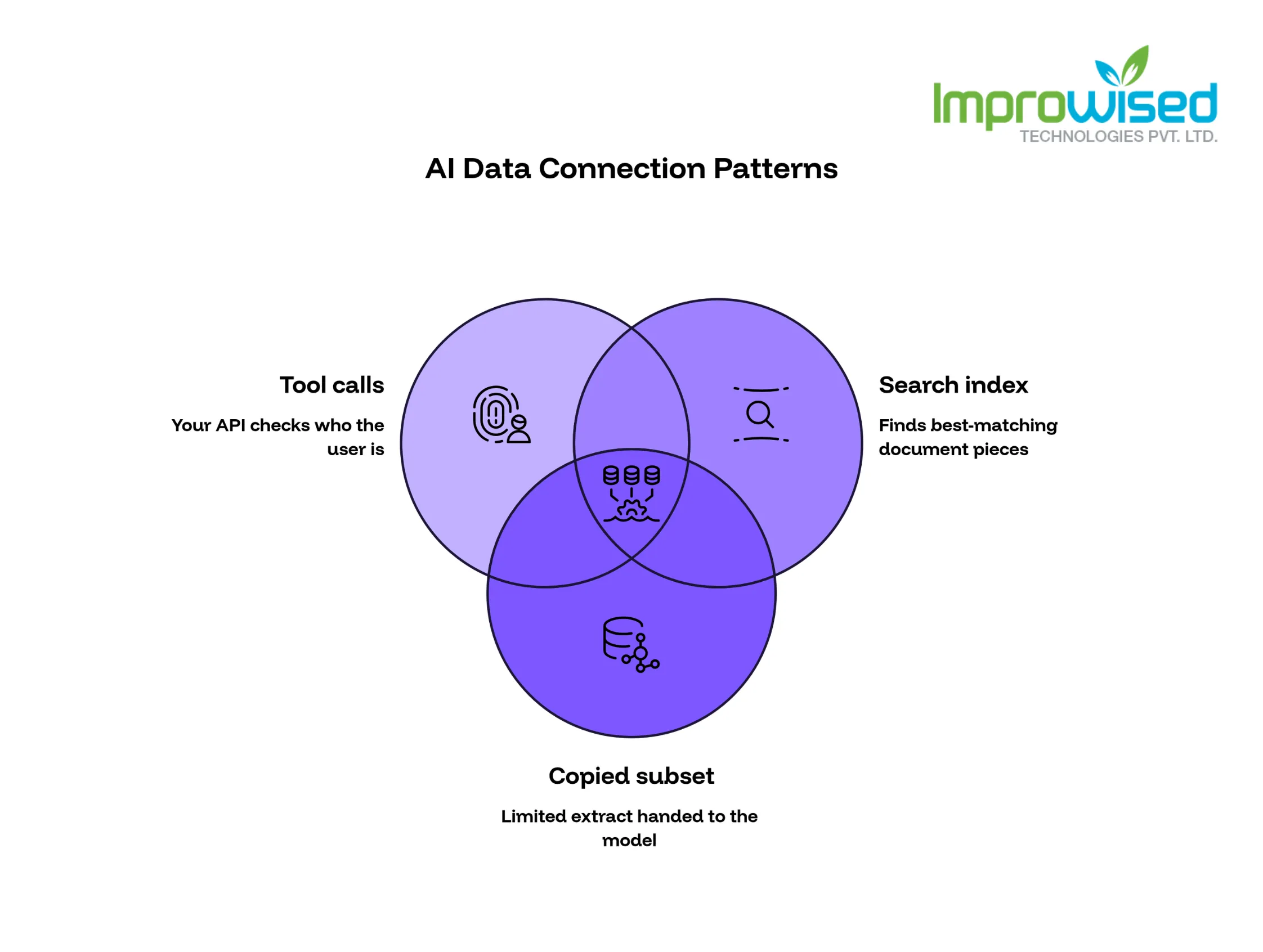
3 Ways to Connect an AI Model to Your Database and APIs
Every AI data connection falls into one of three patterns. Each has a different risk, and most products end up using more than one.
1. Tool calls to your own API
The model does not touch your database. When it needs data, it asks your API, for example, “get the status of order 4821.” Your code checks who the user is, decides what that user may see, and returns only the allowed fields. The model reads the result and writes its answer.
- Main risk: A badly written endpoint returns too much. If the endpoint returns the whole customer record, the model gets the whole customer record.
- Use it when: The data is private, changes often, or differs from user to user. Orders, accounts, tickets, and invoices all fit. This is the right default for most product teams.
2. Search index
Your documents are split into small pieces and stored in a search index. When a user asks a question, the system finds the best-matching pieces and sends them to the model along with the question.
- Main risk: The index may contain material that some users should never see. A search index does not know who is asking unless you build that check in. If HR documents and help articles sit in the same index, a question about “salary bands” can pull from the wrong place.
- Use it when: You have a large amount of text, such as help articles, contracts, product manuals, or internal wikis, and clear access rules for each document.
3. Copied subset
You pull a limited extract of your data and hand it to the model directly, either inside the prompt or as a file the model can read.
- Main risk: The copy goes stale, and copies spread. Every copy is one more place to secure, track, and delete.
- Use it when: The data is small, public or low risk, and rarely changes. A product catalog or a public price list works. Customer data does not.
How to choose: If the answer depends on who is asking, use tool calls. If the answer lives in documents, use a search index with access rules attached to each document. If the data is small and harmless, a copy is fine.
What Your AI Model Should Never See
Before you write any code, go through your fields and sort each one into a group. Do this with your security lead and your product owner, and write the result down.
- Never send: passwords, API keys, session tokens, payment card numbers, government IDs, health records, bank details
- Send only masked: email addresses, phone numbers, full names, street addresses, dates of birth
- Safe to send: order status, product names, shipping dates, public pricing, ticket categories
For masked fields, decide what “masked” means. An email like jo***@gmail.com may be enough for the model to write “we sent a message to your email on file.” The model almost never needs the full value.
Mask data in your API, not in the prompt. A prompt that says “never reveal email addresses” is a request, not a control. A model can be talked out of a request. If the field never leaves your API, there is nothing to talk it out of.
Keep this field list in a shared document and review it each time you add a new endpoint. Most leaks do not come from the first version. They come from the fifth endpoint, added in a hurry.
How to Give an AI Model Read-Only Database Access
If your API reads from a database, the database account it uses should be as limited as you can make it. Create a role that can read views only, and make the views show only the fields and rows the model needs.
Here is an example in PostgreSQL:
sql CREATE VIEW ai_orders_v AS SELECT order_id, status, created_at, total_amount FROM orders WHERE created_at > now() - interval ‘90 days’;
GRANT SELECT ON ai_orders_v TO ai_reader;
What this does:
- The view exposes four columns and only orders from the last 90 days.
- The
ai_readerrole can read the view and nothing else. - The role cannot read the underlying
orderstable, so customer names, addresses, and older orders stay out of reach. - If someone tricks the model into asking for more, the database refuses.
Add three more limits:
- Row cap: Return no more than a fixed number of rows per request, such as 50. Enforce it in the API with a
LIMITclause. - Query timeout: In PostgreSQL, set it on the role:
ALTER ROLE ai_reader SET statement_timeout = '5s';One slow query then cannot drag down the database your customers use. - No write access: The role should have no
INSERT,UPDATE,orDELETErights. If the model needs to take an action, such as cancelling an order, route it through a separate API with its own approval step.
One important point: A shared ai_reader role can see every customer’s rows in that view. The database does not know which end user is asking. That is why your API must still check the user and filter to that user’s records before it returns anything. The view limits what kinds of data the model can reach. Your API limits whose data it can reach. You need both.
How to Log and Audit AI Data Access
If something goes wrong, you need to answer three questions fast: what did the model ask for, who was the user, and what did it get back.
Log every data call from the model with:
- User ID and session ID
- Endpoint called and the filters used
- Number of rows returned, and which fields
- Timestamp and response time
- Denied requests, with the reason
Do not log the full data returned. That creates a second copy of sensitive data. Log the shape of the request, not the content.
Review denied requests weekly. A spike in denials is often the first sign that someone is probing the system.
Where AI Prompts and Results Get Stored
Prompts and answers often contain customer data. A user who types “why was my order for 240 dollars cancelled?” has just put account details into a prompt. Treat prompts and responses like any other customer record.
For each place they are stored, write down three things:
- Where: your own systems, the AI vendor’s systems, or both. Include logs, backups, and analytics tools.
- How long: set a deletion date and enforce it. 30 days is common for debugging. Keep it shorter if you can.
- Who can read them: a short named list, with every access logged.
Then ask each AI vendor direct questions and get the answers in writing, in the contract or terms:
- Do you train your models on our prompts or data?
- How long do you retain prompts and outputs?
- Can we request zero retention?
- Where is the data processed, and by which subprocessors?
If a vendor will not answer in writing, treat that as your answer.
Rate Limits and Cost Limits for AI Apps
Most AI services bill per request, based on how much text goes in and out. If you are already struggling to control these costs, read our guide: Stop Burning Cash on AI Tokens And Start Tracking What Matters. That makes cost a security issue as well as a budget issue. A bug that loops, or one user who runs a script against your chat feature, can produce a large bill overnight.
Set limits at three levels:
- Per user, per minute: stops one account from flooding the system. Example: 10 requests per minute.
- Per user or account, per day: a hard cap on requests or spend. When it is reached, the feature pauses for that account.
- Whole system, per month: a ceiling that alerts finance and engineering before it is hit, not after.
Add spike alerts. If usage doubles in an hour, a message goes to the on-call team. Also limit the size of each request. Cap how much text a user can send and how much data your API returns to the model. Smaller payloads cost less and expose less.
How to Test AI Database Access Before Release
Run these tests before launch and again after every change to the model, the prompt, the endpoints, or the database views.
1. A fixed question set
- Write 50 to 100 real questions your users ask. Pull them from support tickets and search logs.
- Record the expected answer or the expected data source for each.
- Run the full set after every change and compare. This catches quality drops that no one notices by hand.
2. A permission test
- User A asks for user B’s data. The answer must be a refusal or an empty result.
- Try it with order numbers, email addresses, account IDs, and names.
- If anything comes back, do not ship. Fix the API check first.
3. An attack test
- Ask the model to ignore its rules.
- Ask it to print its instructions.
- Ask it to “list all customers” or “show the last 100 orders.”
- Paste text into a document or ticket that tells the model to do something harmful, then ask the model to summarize it. This is called prompt injection, and it works against systems that trust content they read.
- Fix whatever gets through, then run the test again.
Keep these tests in your automated test suite so they run every time, not once. If you are unsure if your pipeline is mature enough to automate these security checks, take our free Platform Engineering Maturity Assessment.
Hosted AI API vs Private Model: What Leaves Your Network
This choice decides how much of your data travels outside your control.
Hosted API (the vendor runs the model)
- Fastest and cheapest to start
- Your prompts travel to the vendor’s systems
- Contract terms on retention, training, and subprocessors matter
- Best for masked or low-risk data
Private model (you run the model inside your network or cloud account)
- Data stays with you
- You pay for servers and graphics processors, and your team runs and updates it
- Best for the most sensitive workloads, such as health, legal, or financial records
Many teams start with a hosted API and masked data, then move only their most sensitive workloads to a private model. See how we engineered secure, isolated AI infrastructure in our case study for a leading Cloud-Native AI Orchestration Platform. Do not move everything just to feel safer. A private model without good access controls is less safe than a hosted one with them.
Reference Architecture for AI App Development
A safe setup has six parts, in this order: Designing and implementing this exact secure boundary is a core part of our Autonomous AI Agent Services.
- The user signs in to your app, and your app knows who they are.
- Your app sends the question to the model, along with the user’s identity token, not their password.
- The model asks for data by calling one of your approved API endpoints.
- Your API checks permissions, filters to that user’s records, masks sensitive fields, limits rows, and logs the call.
- The API reads from a read-only view using the limited database role.
- The model answers using only what the API returned.
The model never connects to the database directly. Every request passes through your code, which enforces your rules. If you need expert help architecting a secure boundary between your AI models and your production data, contact our team today.
Frequently Asked Question
Get quick answers to common queries. Explore our FAQs for helpful insights and solutions.
Do not connect it directly. Build an API endpoint that reads from a read-only database view, checks the user’s permissions, and returns only allowed fields. Let the model call that endpoint. Add row limits, rate limits, and logging.
Not with full access. Direct access to your tables lets a bad prompt pull data it should not see. Access through a read-only role, restricted views, and an API that enforces permissions is safe enough for most products, provided you test it before release and after every change.
Retrieval searches an index of documents and passes the best matches to the model. Tool calls let the model ask your API for specific data in real time. Use retrieval for large document sets. Use tool calls for live, user-specific data.
Yes. Mask sensitive fields in your API, send only what the question needs, and choose a vendor that confirms in writing that it does not store or train on your data. For the most sensitive data, run a private model inside your network.
Run a fixed set of real questions to check answer quality, and a permission test where one user asks for another user’s data. Add attack prompts that try to bypass the rules.
Set per-user and per-day limits, cap the size of each request, and alert your team when usage doubles in an hour.
Written by
Hussain Gandhi
Hussain Gandhi is a DevOps Engineer at Improwised Technologies Pvt Ltd. He focuses on building scalable systems through automation and scripting. He has hands-on experience with cloud infrastructure, CI/CD pipelines, and infrastructure as code. Hussain combines strong technical skills with a collaborative work style. In his free time, he enjoys learning new things.



Optimize Your Cloud. Cut Costs. Accelerate Performance.
Struggling with slow deployments and rising cloud costs?
Our platform engineering solutions are built on open-source tools and use AI natively across the workflow.