
October 14, 2026
Run an LLM Without Internet Access

Chintan Viradiya
Author

Shyam Kapdi
Contributor

Rakshit Menpara
Reviewer
Running a Language Model Inside a Network With No Internet: What You Need and What to Skip
You can run a language model inside an air-gapped network. It needs five things: model files, a GPU server, a serving layer, access control, and a way to bring updates in. It will also do less than a hosted model. This article covers each of the five, how to size the hardware with a simple formula, and a plain list of tasks small local models still get wrong. It is for teams whose data rules rule out sending prompts to an outside service.
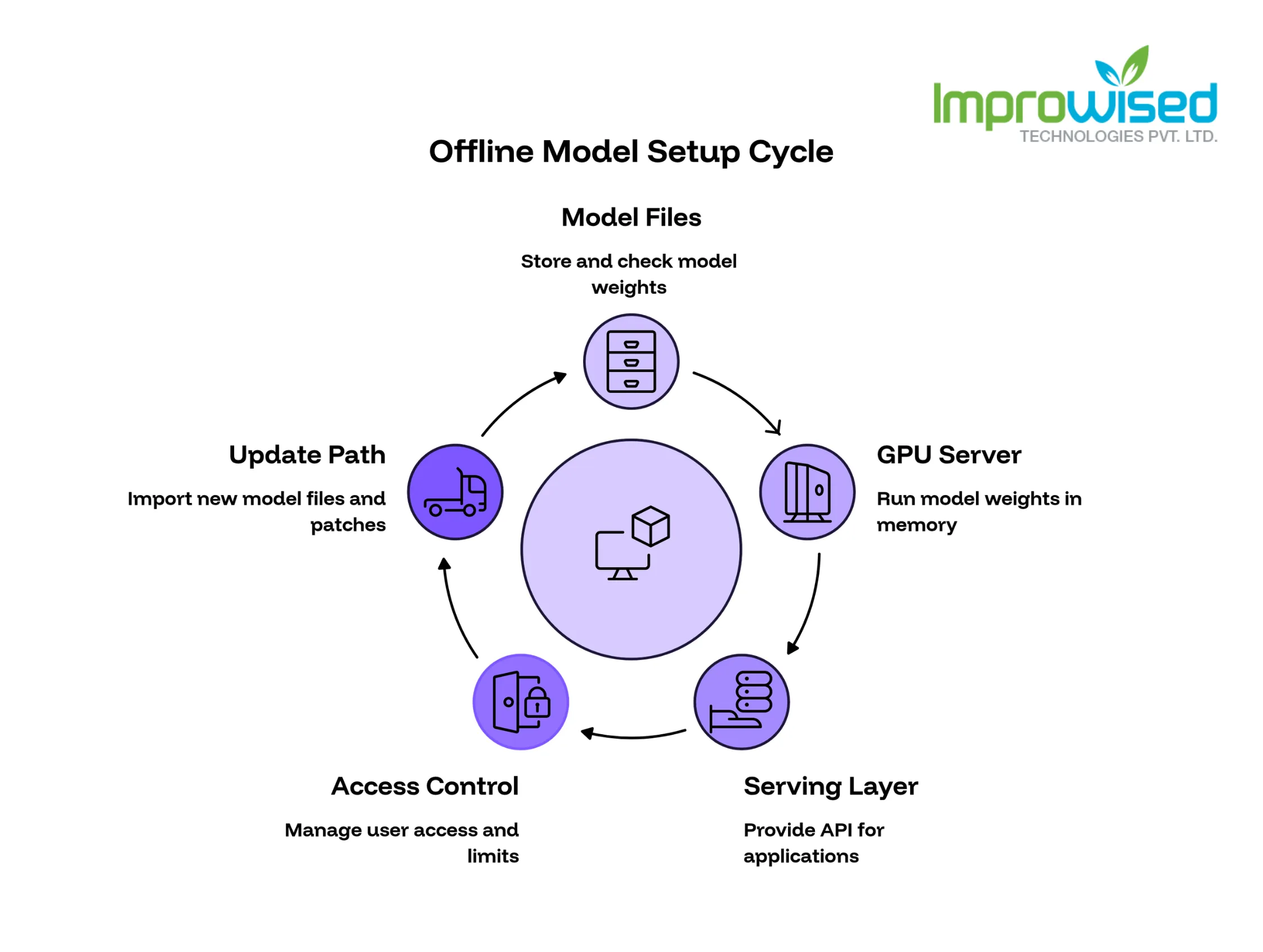
Know what an offline model setup needs
An offline setup has five parts, and each one has to work without any outside connection.
- Model files: the weights, copied in from outside and checked before use.
- GPU server: the machine that holds the weights in memory and runs them.
- Serving layer: one API in front of the model, so every app and chat screen talks to a single endpoint.
- Access control: login, per-team keys, and rate limits, so you know who sent what.
- Update path: a routine way to bring in new model files and runtime patches.
The network boundary sits around all of it. Nothing inside calls out, and nothing outside calls in.
+--------------------- network boundary (no internet) ---------------------+ | | | Users / apps —> Serving layer —> Model on GPU server | | (chat screen, (login, keys, (weights in GPU memory) | | internal tools) rate limits, logs) | | | | Updates arrive only through an import step (checked files, by hand) | +--------------------------------------------------------------------------+
What this means: the model is one more internal service. You run it, patch it, and audit it the way you run any other system that holds sensitive data.
Decide when an air-gapped deployment is the only option
Choose an air-gapped deployment when the data may not leave the building. That usually comes from a contract clause, a regulation, or secrecy rules that forbid sending prompts to any outside party. If a rule says “no third-party processing,” a hosted API fails the test no matter how good its answers are.
A private cloud tenant is enough in some cases. It works when your rules allow a provider to hold your data, but not to share infrastructure or train on it. Before you settle for that, get written answers from the provider on these points:
- Where prompts and outputs are stored, and in which country.
- Whether provider staff can read your data, and under what conditions.
- Whether your data is ever used for training or evaluation.
- How long prompts and outputs are kept, and how deletion is proven.
- Which sub-processors touch the data.
- Whether you can pull audit logs of access.
If any answer conflicts with your rules, the private tenant is out and you are back to running the model yourself.
What this means: the test is whether the data may leave the building, not whether the model is good. Ask your legal or compliance lead that question first, before anyone compares model quality.
Get model files in safely
Start with the licence. Confirm it allows commercial use and allows you to keep offline copies, and store the licence file next to the model files. Some open model licences limit commercial use or set conditions on large deployments, so read the text for each model and do not rely on a summary.
Next, record a checksum for every file. On a connected machine, download the files and run a checksum command such as sha256sum. Save the output with the files. Run the same command inside the network after the copy and compare the two.
Move the files the way you move patches: through a controlled import point, such as a scanned transfer host or approved media, with a named person signing off. Keep a short record of the model name, version, source, licence, checksum and import date.
Do not pull weights from a public hub directly onto a production machine, even briefly. Do not accept files from a colleague’s laptop without a checksum that traces back to the original source.
What this means: a model file is software from outside your network. It gets the same checks as any other software you bring in, and you keep the paperwork for an audit.
Size the hardware
The memory for the weights is roughly the parameter count times the bytes stored per parameter. On top of that, add memory for the context cache, which grows with prompt length and with the number of users at once, and for runtime overhead. Treat the figures below as floors, not targets.
Quantization means storing the weights with fewer bits to save memory, at some cost in quality.
- 7B model: about 14 GB at 16-bit, 7 GB at 8-bit, and 3.5 GB at 4-bit.
- 70B model: about 140 GB at 16-bit, 70 GB at 8-bit, and 35 GB at 4-bit.
The formula works like this. A 70B model at 8-bit stores one byte per parameter, so 70 billion parameters come to about 70 GB. That is before the cache and overhead. Ten people sending long prompts at once need far more cache than two people sending short ones, so size for your real peak and not your average.
We do not size by the weights figure alone. A model that “fits” with no room left for the cache will run out of memory as soon as prompts get long or more users join.
Measured numbers from a real deployment. For concrete hardware metrics and performance results from a production environment, read our case study on building a Cloud-Native AI Orchestration Platform.
What this means: the weights decide the minimum GPU memory, and your user count and prompt length decide how much more you need. Ask for expected users and typical prompt length before you buy hardware.
Serve it and control access
Put one API layer in front of the model. Apps and chat screens then use a single endpoint, and you can swap the model behind it without changing anything on the client side. Add login, per-team keys, and rate limits at this layer, so one team cannot use up the whole GPU and every request maps to an owner.
Worked example. OurearlierpostonaLiteLLMproxywithOpenWebUI—slug:confirm sets this up. LiteLLM is the proxy that gives apps one endpoint and handles keys and limits. OpenWebUI is the chat screen people use. Both run inside the network, and neither needs the internet once installed. Read that post for the install steps; the same shape works for any model you serve.
Three decisions to make at this layer:
- Who gets a key: one key per team, not per person, unless your rules say otherwise.
- What the limits are: set requests per minute and a cap on prompt length for each key.
- Where login comes from: use your existing directory so leavers lose access when they leave.
We do not expose the model runtime directly to users. It has no concept of teams, quotas, or audit trails, and the serving layer does.
What this means: one front door gives you control. You can see who uses the model, cut off a team that misbehaves, and change the model underneath without telling anyone. Designing and deploying these secure, centralized gateways is a core part of our Platform Engineering Services.
Log without leaking prompts
Log the user, the time, the model name, the token counts, and the latency for every request. These fields tell you who used the system, how much, and how fast it ran, and none of them contain the content of a prompt.
Then decide whether to store prompt text. Prompts often hold the exact data you built the air gap to protect, so the log can become the most sensitive file in the system. There are two sound choices:
- Store the text: encrypt it at rest and limit who can read it to a short, named list. Set a retention period and delete on schedule.
- Do not store the text: keep a hash of each prompt instead. A hash lets you confirm that a known prompt was sent without keeping a readable copy.
A hash cannot be reversed, but it can be matched against a text you already have. Treat it as a record of use, not as something safe to share widely.
We do not turn on full prompt logging by default. It is a decision for your security lead, made with your retention and audit rules in hand.
What this means: logs prove who used the model without becoming a second copy of your secrets. Pick the policy before launch, because changing it later means dealing with logs that already exist.
Update models over time
A new model file is an import, like a patch. It goes through the same steps as the first copy: licence check, checksum, controlled transfer, signed record. Pin versions by file name and checksum, so you always know which model answered a given request.
Before you switch, test the new model against a fixed set of real prompts, for example, 50. Pull them from actual use, with sensitive details removed if your rules require it. Run the old and new model on the same set and compare the answers side by side, by a person who knows the subject.
Keep the old model on disk and keep its serving config. If the new one gets worse on a task that matters, you switch back in minutes. Remove the old version only after the new one has run in production long enough for you to trust it.
We do not switch a model because a newer one exists. We switch when it does better on your prompts.
What this means: updates are planned changes with a rollback, not automatic upgrades. The test set is what tells you whether the change is an improvement. If your infrastructure team struggles to execute rollbacks smoothly, take our free Platform Engineering Maturity Assessment to identify the gaps in your pipeline.
Know what small models cannot do
Local models in the 7B to 70B range still fall short in these areas:
- Long documents: anything past the model’s context limit is cut off or ignored. A 200-page contract will not fit in one prompt.
- Multi-step reasoning: problems that need several linked steps, such as complex calculations or planning, produce more errors.
- Reliable tool calls: asking the model to call a function or fill a strict format works less often than with top hosted models, so you need checks on the output.
- Uneven language quality: answers in some languages are noticeably weaker than in English. Test every language your users write in.
- No current information: the model knows only what was in its training data, and the air gap means it cannot look anything up.
Tell the team no when the task needs current facts or top-tier reasoning. Examples are “what changed in this regulation last month” and “find the flaw in this financial model.” A smaller model will answer confidently and be wrong.
Short tasks on short inputs, such as drafting, summarizing a page, or classifying a ticket, are a better fit. Test each one on your own prompts before you promise anything.
What this means: decide up front which tasks go to the local model and which do not. The failures come from using it for the wrong jobs.
Frequently Asked Question
Get quick answers to common queries. Explore our FAQs for helpful insights and solutions.
Yes. Copy the model files in through a controlled import, run them on a GPU server inside the network, and put a serving layer with access control in front. Nothing needs to call out once it is installed.
It depends on the model size and the number of users. Start from the weights floor: about 3.5 GB for a 7B model at 4-bit and about 35 GB for a 70B model at 4-bit. Then add memory for the context cache and runtime overhead, based on your prompt length and peak users.
No, not on hard reasoning, long documents or current facts. For narrow tasks on short inputs it can be good enough. Test it on your own prompts before you decide.
Written by
Chintan Viradiya
Chintan Viradiya is a DevOps Engineer at Improwised Technologies. Passionate about Infrastructure as Code and CI/CD pipelines, he focuses on optimizing cloud deployments and enhancing the security and performance of modern applications. He plays a key role in ensuring high availability and driving DevOps best practices across projects







Optimize Your Cloud. Cut Costs. Accelerate Performance.
Struggling with slow deployments and rising cloud costs?
Our platform engineering solutions are built on open-source tools and use AI natively across the workflow.