
August 27, 2026
Jira to Asana Migration: A Practical Checklist for Engineering Teams

Brij Mandaliya
Author

Rakshit Menpara
Contributor

Shailesh Davara
Reviewer
We recently migrated five years of engineering data out of Jira and into Asana: three projects, thousands of issues, every comment, every attachment, and every parent-child link we could reconstruct. It took longer than we expected, not because moving data is hard, but because moving context is.
The first thing the pipeline taught us is that the import is the easy part. The hard part is the five decisions you make before writing code: where statuses live, how comments keep their real authors, what happens to users who left two years ago, how you restart after an API timeout, and how you prove to stakeholders that nothing went missing. None of those are in Asana’s built-in Jira importer.
This post is the checklist we wish we’d had before we started, including the 9-phase pipeline, the field-mapping decisions that quietly decide the success of the project, the parts where we got stuck, and what we deliberately decided not to migrate.
Why Most Jira-to-Asana Migrations Lose Context
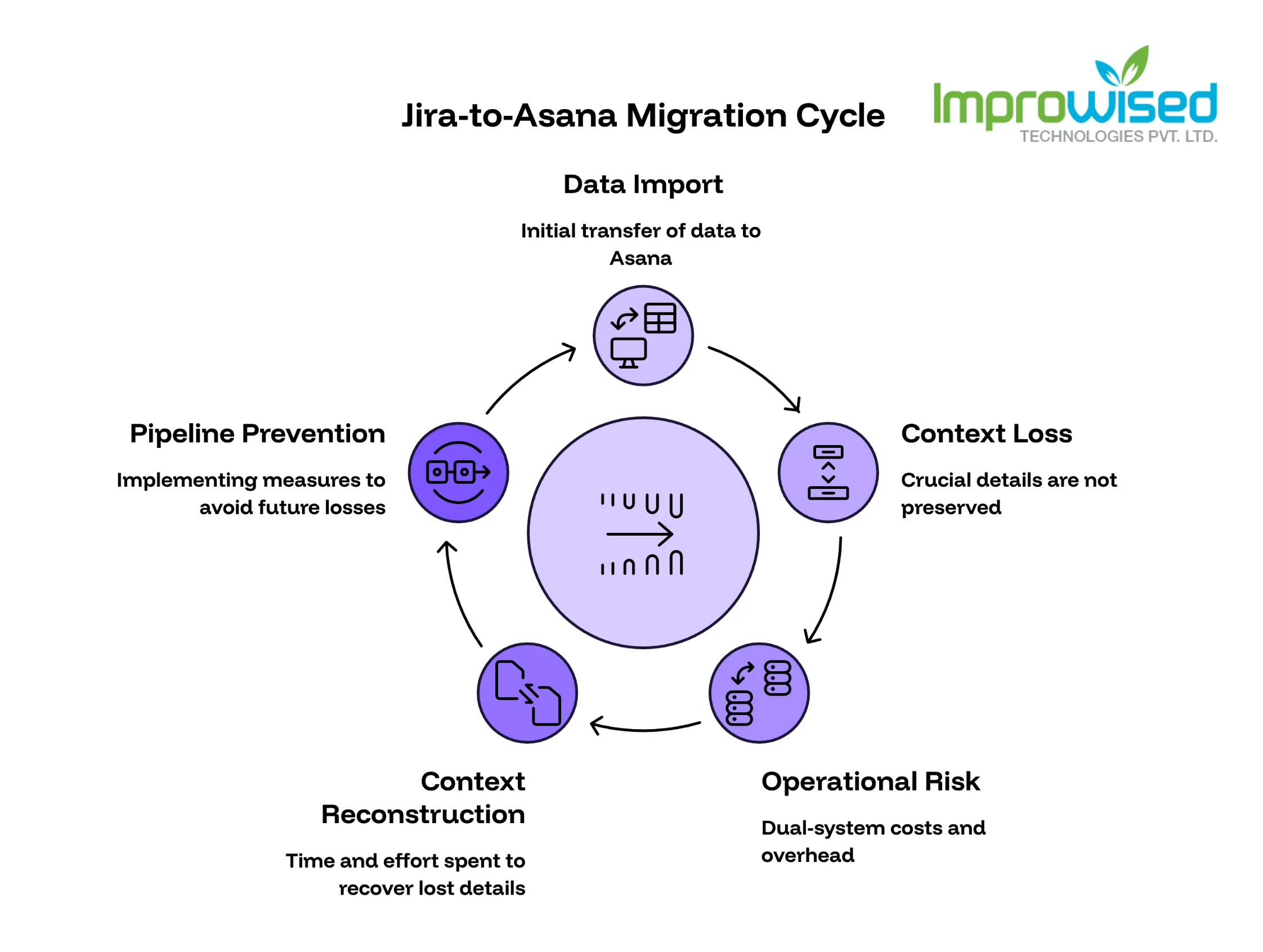
Most failed Jira-to-Asana migrations don’t fail at the import step. They fail earlier, when teams assume that if the data is in Asana, the work is preserved.
What gets lost is rarely visible in a status report:
- A comment from a former engineer explaining why a decision was made.
- An attachment that contained the only copy of a customer screenshot.
- A status mapping where “In Review” in Jira meant code review, but the same string in Asana meant something else.
- A Jira user who changed email addresses after leaving, and whose name now matches no one.
These are exactly the kind of details that turn a migration from “data moved” to “work preserved.” They are also the kind of details that nobody asks about until three months later, when someone tries to look up a decision and cannot find it.
We saw this happen on a previous, lighter migration where we trusted the built-in importer. A year later, a support engineer spent two days reconstructing context that should have been in the migrated ticket. That’s the failure mode we built this pipeline to prevent.
This is also why migrations are an operational risk even when they succeed. The same dual-system cost pattern that traps cloud-to-on-prem migrations and any unfinished migration debt applies here: until the old system is fully retired, your team is paying the maintenance and mental overhead of two tools.
What a Reliable Migration Actually Requires
Before any code, the migration needs five artifacts in place. Skip any one and the project drifts.
1. A field-mapping document. A single source of truth that names every Jira field, every Asana destination, and every edge case. If a mapping decision is not in this document, it does not get made in code.
2. A user reconciliation list. A spreadsheet that maps Jira users to Asana users by email, with name and manual review as fallbacks. People change jobs, change names, and change emails. This list is what stops tasks from silently becoming “unassigned.”
3. A status mapping. Decides which Jira status becomes an Asana section (for board organization) and which becomes a custom field (for filtering and reporting). The same status often needs both.
4. An idempotency plan. Networks fail, APIs rate-limit, and a migration that runs for hours will be interrupted. The pipeline must be restartable without creating duplicates.
5. A validation report template. A document stakeholders will receive at the end that shows exactly what was migrated, what was skipped, and what warnings or errors occurred. Without it, the migration is unverifiable.
We treated each of these as a deliverable with an owner, not as a step in the pipeline. That framing is what kept the migration honest.
The 9-Phase Pipeline We Built
We split the migration into nine independently runnable phases. Each phase writes a JSONL log so a failure in phase 6 does not require restarting from phase 1.
Phase 1: Preparation
Verify Python dependencies, Asana credentials, and output directories. Generate sample Jira data when needed for testing. Set --dry-run as the default; nothing writes to Asana until a human flips it.
Phase 2: Asana project check
Verify the destination projects exist and create them if needed. The standard sections we use: To Do → In Progress → In Review → Blocked → Done → Won’t Do. If a section is missing, the task lands in the wrong column.
Phase 3: Jira data translation
Read the Jira JSONL/XML export and convert it into Asana-ready records. Two passes: first, Epic tasks; second, child tasks. The first pass stores Asana IDs for every Epic, because a child task cannot reference a parent that has not been created yet.
Phase 4: Project creation
Create any missing Asana projects and their standard sections.
Phase 5: Tag creation
Convert Jira labels (frontend, urgent, customer-reported) into Asana tags and capture the tag IDs. Tags must exist before tasks reference them.
Phase 6: Task creation
Create every Jira issue as an Asana task with section, tags, assignee (when matched), and the original Jira key embedded in the description. Epics go first, then their child tasks.
Phase 7: Custom field assignment
Set priority and any other custom fields using the field IDs collected earlier. Asana requires the custom-field ID, not the name, so this phase depends on the discovery work in Phase 2.
Phase 8: Comments and attachments
Convert Jira comments into Asana stories and upload attachments (screenshots, PDFs, logs). We prepend the original author and timestamp to each comment, because Asana attributes bot-created stories to the API user, and that destroys audit value.
Phase 9: Validation report
Produce a report that shows task counts, comment counts, attachment counts, warning counts, and error counts. Stakeholders review this. If they reject it, the migration is not done.
Field Mapping: The Decisions You Make Before Code
Field mapping is not a spreadsheet you fill in once. It is a series of irreversible decisions that quietly determine whether the migration is useful six months from now. These four choices were the load-bearing ones.
Statuses: Section + Custom Field
A Jira status like In Progress needs two destinations in Asana: a section, so the board view stays familiar, and a custom field, so reports and filters can still use it. We use both. If you use only a section, you lose the ability to filter by status across projects.
Epics: Parent Tasks, Not Custom Fields
Asana has real parent-child task relationships, so we use them. Jira Epics become parent Asana tasks; their related issues become subtasks. We avoided the common shortcut of representing Epics with a custom field, because that would have hidden the hierarchy from the board, which is the whole point.
Comments: Original Author Preserved
Every Jira comment becomes an Asana story, but with the original author and timestamp prepended:
Posted By [email protected] at 2024-03-12 09:14 UTC:
Confirmed with the customer that the duplicate charge is from the retry logic, not a billing bug.
Without this prefix, every comment would appear to come from the API user, and six months later nobody would trust the audit trail.
Users: Email First, Name Second, Manual Third
We match Jira users to Asana users in this order: email, name, then a manually curated list for the rest. Tasks that cannot be matched stay unassigned, but the original Jira email is preserved in the description. A human resolves them later without losing who originally owned the work.
Where the Pipeline Almost Broke
Three parts of the migration were harder than the others. Each one taught us something the field-mapping document had not captured.
User matching for people who had left
Out of roughly 80 Jira users across the three projects, 19 had no Asana account. Some had left the company, some had changed email addresses, and some had been contractors whose accounts were deleted. The reconciliation spreadsheet was the only thing that kept these tasks from becoming silently anonymous. We had to build a small dashboard that surfaced unmatched users so a human could resolve them in one pass rather than during the migration.
Epic-then-child ordering
We lost half a day to this. The pipeline initially created tasks in the order they appeared in the Jira export, which meant children tried to attach to Epics that did not exist yet. Asana rejected the calls, and we ended up with hundreds of orphaned tasks. The fix was the two-pass structure in Phase 3 and Phase 6, which forces Epics to exist before their children do. This is the same dependency-ordering problem that catches teams in stateful service migrations, where you cannot redirect traffic until the new state is verified.
Restarting after a partial failure
The first full dry-run failed at task 1,842 of around 6,000, when an API rate limit hit during a comment batch. Without idempotency, restarting would have created duplicates of the 1,841 tasks that had already been created. We solved it by writing a JIRA_KEY → ASANA_GID mapping file after every successful task creation:
PROJ-1234 → 1209876543210987
PROJ-1235 → 1209876543210988
On restart, the pipeline reads this file and skips already-created tasks. The first comment of every task also includes the original Jira key, so even if the mapping file were lost, we could reconstruct it by searching Asana for Originally from Jira: PROJ-.
Preserving the original metadata as a safety net
Every migrated task includes its original Jira key in the description:
---
Originally from Jira: PROJ-1234
And the first comment carries the original creator, assignee, and timestamp:
Created By: [email protected]
Assign To: [email protected]
At: 2024-02-26 07:27 UTC
This is the fallback. If a field mapping is wrong, if a user is unmatched, or if a stakeholder needs to verify provenance, the original information is recoverable. The cost is one short block of text per task. The benefit is that the migration never becomes a black box.
Why Sample Data Saved Us a Week of Pain
Before we touched any production data, we generated a fake Jira export with realistic issues, comments, attachments, Epics, edge cases, and a few deliberately broken records. We ran the full pipeline against it.
That caught problems we would not have seen until production:
- A label that contained a slash (
team/frontend) broke tag creation. We added escaping. - A Jira comment with an
@mentionrendered as raw text in Asana. We added mention stripping. - A custom field that did not exist in Asana caused silent failures. We added explicit existence checks before assignment.
- A status called “QA Pass” did not exist in our standard section list. We added it.
We also wrote automated tests for the translation layer, so any future change to field mapping could be validated against expected output before running on real data. This is the same defensive pattern we use in CI pipelines that need to recover from partial failures: never trust that the happy path is the only path.
What We Deliberately Did Not Migrate
Honesty about scope is part of doing the migration well. We told stakeholders up front that the following would not be preserved, and got sign-off before the pipeline started:
- Live synchronization. This was a one-time migration, not a sync. Jira and Asana would diverge from the moment the migration finished.
- Boards and sprints. These are Jira concepts that do not map cleanly to Asana. We did not try to fake them.
- Full change history. Each task carries its current state, not every transition. Asana has its own activity log, and backfilling five years of Jira history would have doubled the migration time without changing day-to-day work.
- Every Jira formatting variant. Rich text, custom macros, embedded JQL queries, and Jira-specific markup were flattened to plain text where necessary. Anything that could not be cleanly represented was preserved in a comment, not lost.
Documenting these limitations before the migration started is what kept the conversation with stakeholders grounded. The validation report tells them what was migrated. The pre-migration document tells them what was not. Together, those two documents are the audit trail.
Key Lessons
If we had to compress everything above into seven decisions to make before writing any migration code, it would be these.
- Map every field on paper first. If a decision is not in the mapping document, it will be made under pressure during the migration. Make it now.
- Treat user reconciliation as a first-class deliverable. Roughly a quarter of our users had no clean match. Plan for it.
- Make the pipeline restartable. Networks fail. APIs rate-limit. A migration that is not idempotent is a migration that will be run twice.
- Use Epics as parents, not custom fields. Real hierarchy beats clever metadata.
- Preserve the original Jira reference inside every migrated task. It is the cheapest insurance against future mapping mistakes.
- Test on realistic fake data, then a small real subset, then the full set. Each stage catches different bugs.
- Document what is out of scope before the migration starts. The pre-migration document protects you from “but you said everything would be migrated” conversations later.
If your team is planning a similar migration, the same shape works whether you are moving between Jira, Asana, Linear, GitHub Issues, or any combination. The tools change. The decisions are the same: map first, preserve provenance, make it restartable, validate twice, document the limits.
If you are about to start a migration that touches years of engineering context and you want a second pair of hands on the field-mapping document or the pipeline design, our platform engineering team has done this before. The first hour of conversation usually saves a week of debugging.
Frequently Asked Question
Get quick answers to common queries. Explore our FAQs for helpful insights and solutions.
Field mapping is the document that decides where every Jira field, status, user, Epic, and relationship ends up in Asana. Without it, teams start coding first and discover ambiguities mid-migration, when fixes are expensive. We wrote the mapping before any pipeline code.
For simple projects with light history, often yes. For five years of comments, attachments, custom workflows, and unmapped users, the built-in import covers only part of the work. A custom pipeline is the realistic path to full fidelity.
Their tasks remain unassigned in Asana. The original Jira assignee email and creation time are preserved in the task description and the first comment, so a human can resolve them later without losing who did the work.
Yes, by design. After every successful task creation we store a Jira-key to Asana-GID mapping. On restart, the pipeline skips already-completed work, so a network blip or API rate limit never creates a duplicate.
Each Jira comment becomes an Asana story with the original author and timestamp prepended, because API-created stories otherwise appear to come from the bot user. Attachments are uploaded to the matching task and linked back to the original Jira reference.
Jira Epics become parent Asana tasks, and their related issues become subtasks. We create Epics in a first pass and capture their new Asana IDs before creating child tasks, because Asana cannot link a child to a parent that does not exist yet.
Written by
Brij Mandaliya
Full Stack Developer at Improwised Technologies focused on building reliable, production-ready software from backend to frontend. Experienced with Vue.js, Nuxt.js, React.js, Laravel, Node.js, AWS(job/queue systems), REST APIs, , containerization, real-time features, and workflow automation. I enjoy turning complex requirements into clean, scalable solutions.






Optimize Your Cloud. Cut Costs. Accelerate Performance.
Struggling with slow deployments and rising cloud costs?
Our platform engineering solutions are built on open-source tools and use AI natively across the workflow.